
Making a Reel no longer means you need actors, a camera, a location, and a folder full of footage before you can begin. You can start with a simple idea, a photo, an illustration, or even an existing video, then use AI to turn it into a short clip that lasts anywhere from a few seconds to much longer.
In this guide, “Reels” does not only mean Instagram Reels. The same workflow can be used to create vertical short-form content for TikTok, YouTube Shorts, and other social platforms. If you already have an image, you can start with Movmix AI Image to Video. If all you have is an idea, use AI Text to Image to create the visual first.
The workflow is simple: Idea → Visual → Motion → Generate → Review → Publish.
How to Make a Reel With AI in 4 Steps
Step 1: Decide on One Main Event
A short video does not need five plot twists. Start by describing one thing that happens: “A tram starts moving inside an old postcard,” “A paper train enters a forest station,” or “A butterfly flies out of an illustrated book.”
One Reel should usually focus on one main change. It is easier for viewers to understand, and much easier for an AI video model to generate consistently. If your idea already needs three uses of “and then” just to explain it, you are probably trying to fit too much into one clip.
Step 2: Prepare the Key Visual
Your Key Visual can be an existing photo or an AI-generated image. What matters is not how flashy it looks, but whether the subject is clear, the composition works in vertical format, and there is enough space for the action you want to create.
A messy image rarely becomes elegant just because it starts moving. Most of the time, it simply becomes a moving mess.
Step 3: Describe Motion, Not the Entire Image Again
The image already tells the model what the subject, environment, and colors look like. Your Video Prompt does not need to introduce the whole scene all over again.
A more useful structure is:
Current state + What happens next + What must stay unchanged
Instead of writing:
A European hill town with a yellow tram, orange rooftops, and a blue-green bay...
write:
The yellow tram slowly moves forward, the clouds drift gently, and the camera slowly pushes into the scene while the buildings, road, and tram design remain unchanged.
The job of the Video Prompt is to tell the image what happens next, not write its biography.
Step 4: Review Before You Regenerate
After the first generation, check four things: subject consistency, motion quality, background stability, and whether the ending feels complete. If 80% of the result already works, fix the specific problem instead of rewriting the entire prompt from scratch.
AI video is a little like shooting multiple takes. The main difference is that the model will not get annoyed after Take 6.
Example 1: Bring an Old Postcard to Life
This is a great first project for image to reel AI because there is no complicated character motion, but the visual transformation is immediately obvious.
Video Prompt
Begin naturally from the current postcard image. The white clouds move slowly across the sky, subtle ripples appear on the distant sea, and nearby leaves move gently in the breeze. The yellow vintage tram then begins moving slowly forward along the existing street. Keep the tram design, road layout, and architecture unchanged. The camera very slowly pushes into the scene, gradually giving the flat postcard a stronger sense of depth and space. Maintain the faded vintage travel-photography look and subtle paper texture throughout. Do not suddenly turn the image into modern digital footage. Do not alter the roads or buildings. No scene cuts.

What it does: Turns a static travel postcard into a moving city memory with subtle depth and motion.
Best for: Travel Reels, nostalgic content, city culture, and creative short videos.
Watch out: A moving tram, clouds, and a little wind are enough. You do not need to turn the entire town into a disaster movie.
Example 2: Turn Paper Art Into Animation
Reels do not need real people. Illustration, paper art, stop-motion-inspired visuals, and other stylized formats can actually be some of the most interesting AI video material.
Video Prompt
Keep all paper materials, handcrafted structures, and layered paper textures unchanged. A small red paper train slowly appears from deep inside the forest and moves naturally toward the station along the existing track. Nearby paper leaves move gently, while layered paper clouds drift very slowly across the sky. The warm station lamp remains steadily illuminated. Keep the camera fixed with only a very subtle natural depth-of-field change. Every object must remain in the same handcrafted paper-art style. Do not turn the train or forest into realistic live-action objects. Do not add new characters.
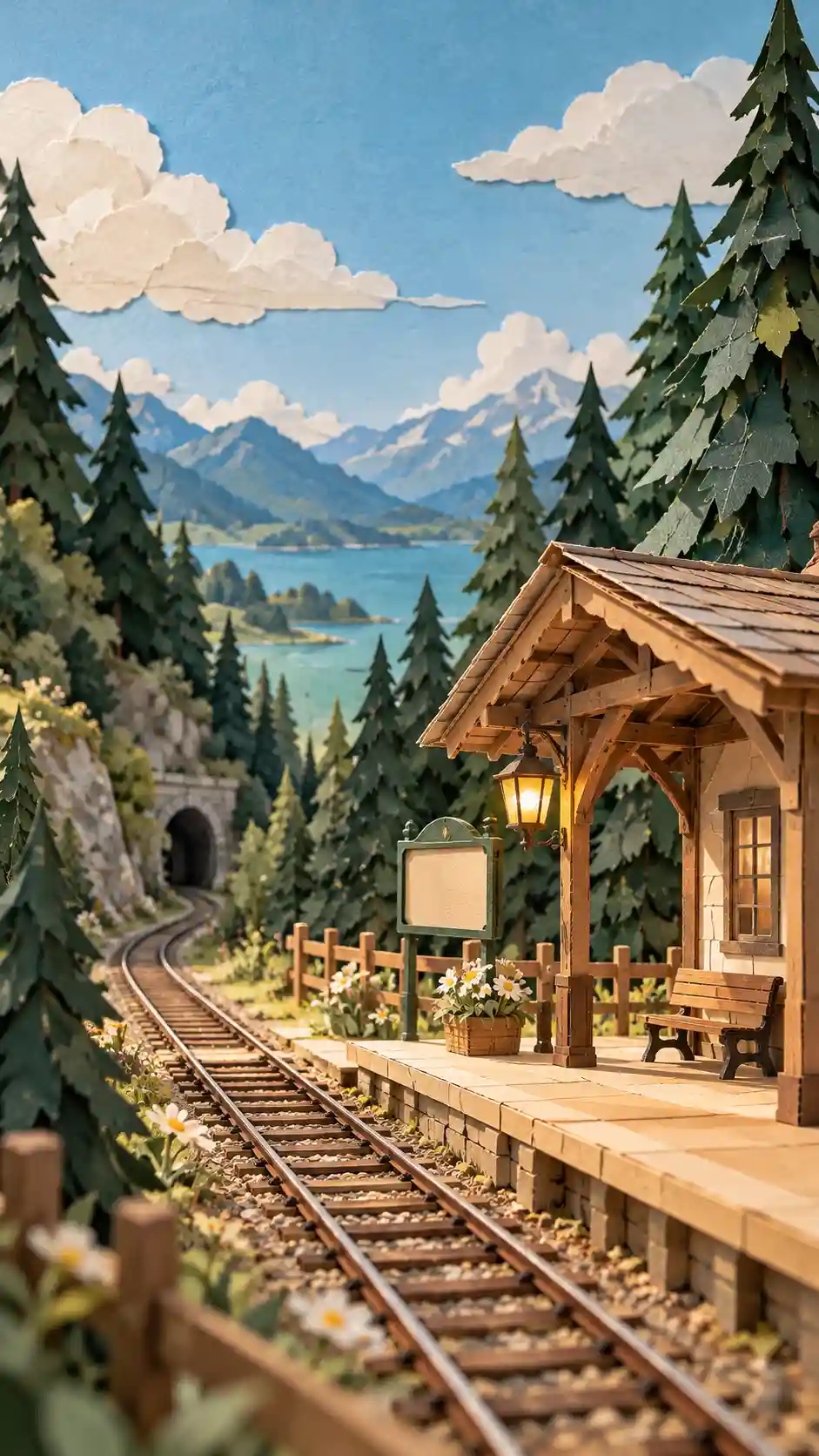
What it does: Turns a static paper-art scene into a small animated world.
Best for: Animation accounts, design content, art Reels, and visual experiments.
Watch out: Make the material consistency explicit. Otherwise, your handmade paper railway may suddenly decide it wants to become a real national rail service.
Example 3: Create a Miniature Story That Would Be Hard to Film
This is where AI Reels get more interesting. Instead of simply replacing real-world filming, you can create scenes that would be expensive, inconvenient, or slightly ridiculous to build in real life.
Video Prompt
Begin naturally from the current frame. The miniature astronaut stands still for a moment, observing the giant strawberry, then carefully takes two small steps toward it. As the astronaut approaches, a soft warm red glow slowly appears from inside the strawberry, gradually illuminating the astronaut's white spacesuit and the surrounding wooden table. The astronaut stops and slightly raises their head to examine the glowing strawberry. The camera slowly pushes forward while preserving the strong scale difference between the tiny astronaut, giant strawberry, and normal-sized kitchen. Do not make the strawberry explode. Do not add excessive light effects. No scene cuts. Keep the astronaut's appearance unchanged.
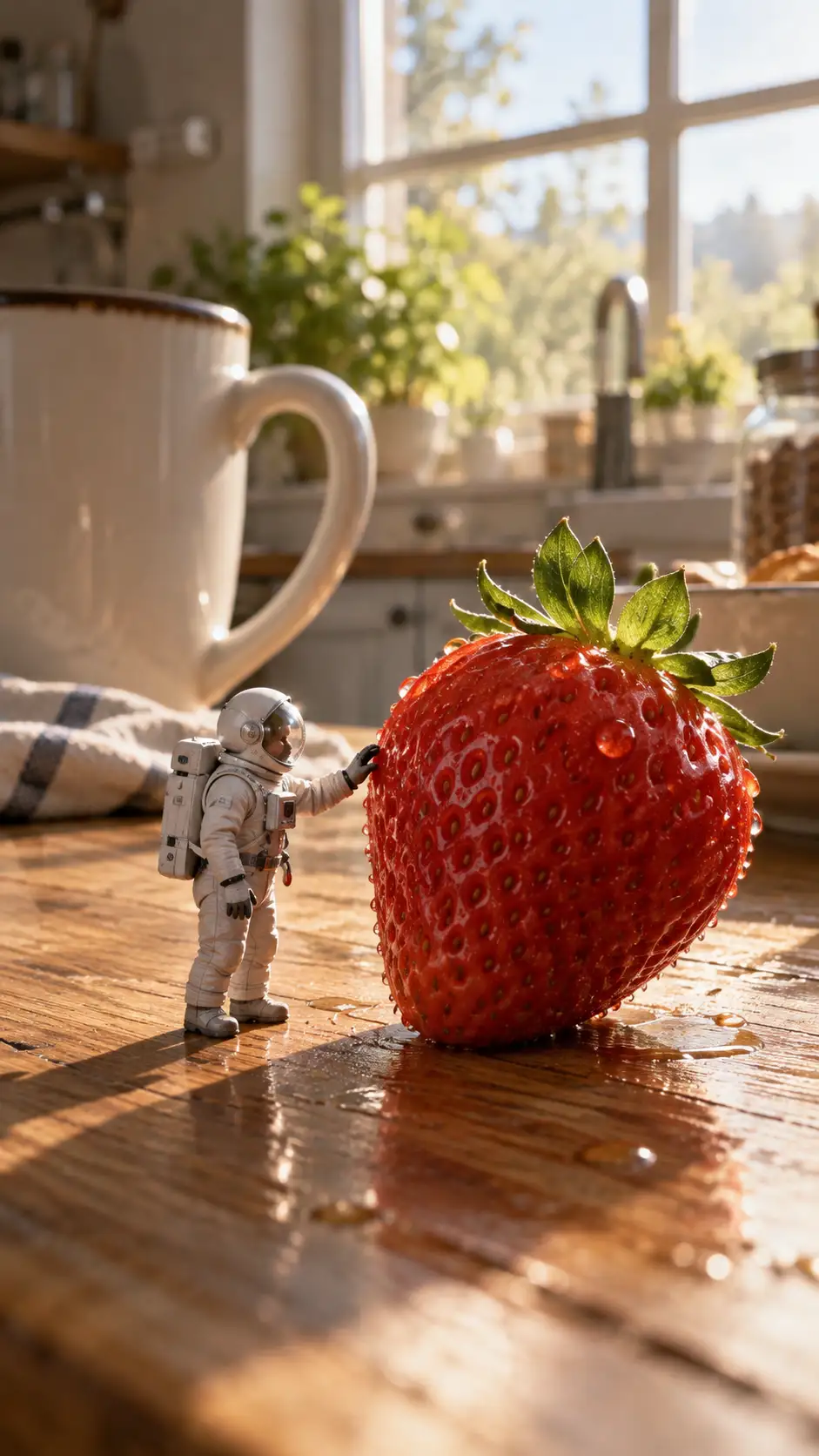
What it does: Uses a strong scale contrast and one simple event to create a complete mini-story in just a few seconds.
Best for: Creative Reels, AI visual accounts, sci-fi content, and miniature storytelling.
Watch out: The strawberry already glows. That is enough. It does not also need to open an interdimensional portal five seconds later.
Example 4: Make a Mood Reel Without Any Characters
Not every short video needs someone walking toward the camera. A strong environment, weather, and subtle camera movement can be enough to hold attention.
Video Prompt
Keep the theater architecture, lighting, furniture, and all interior elements stable. Rain continues falling naturally outside the glass entrance. Water slowly runs down the glass, while reflections on the wet street shift subtly. One vintage wall lamp deeper inside the lobby flickers gently once, then returns to a steady glow. The camera moves very slowly forward from the entrance into the lobby but does not enter the screening room. Maintain a quiet, realistic, slightly nostalgic cinematic atmosphere. Do not add people. Do not alter the architecture. Do not suddenly change the lighting.
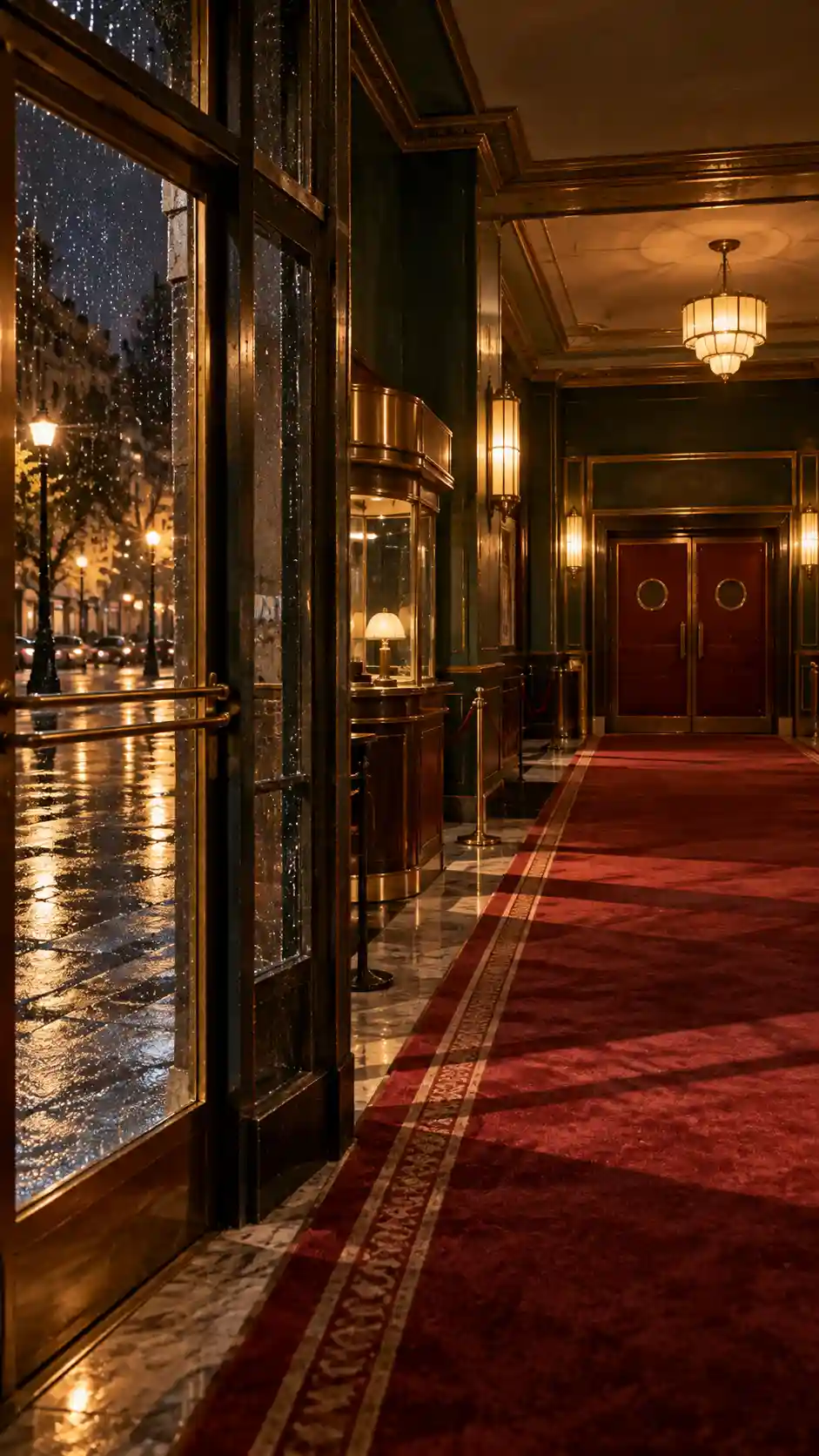
What it does: Uses rain, lighting, and slow camera movement to give an empty space emotional weight.
Best for: Mood Reels, music visuals, photography, travel, architecture, and cinematic content.
Watch out: The restraint is the point. Adding ten people, lightning, and flying objects is probably the fastest way to ruin it.
Example 5: Use One Impossible Change as the Hook
A short video does not need dozens of objects moving at once. Sometimes one impossible transformation is enough to make people keep watching.
Video Prompt
Keep the book, table, magnifying glass, and study environment completely stable. The blue butterfly illustration on the page remains still at first, then its wings begin moving very slightly and naturally. After a moment, the butterfly slowly lifts out of the flat illustration and becomes three-dimensional while preserving the same blue pattern. It gently settles on the edge of the open page. The camera slowly moves closer to the book. The entire transformation should feel continuous and natural, with no flashes, explosions, or excessive magical particles. Keep the other botanical illustrations and page content still. Do not change the page structure.
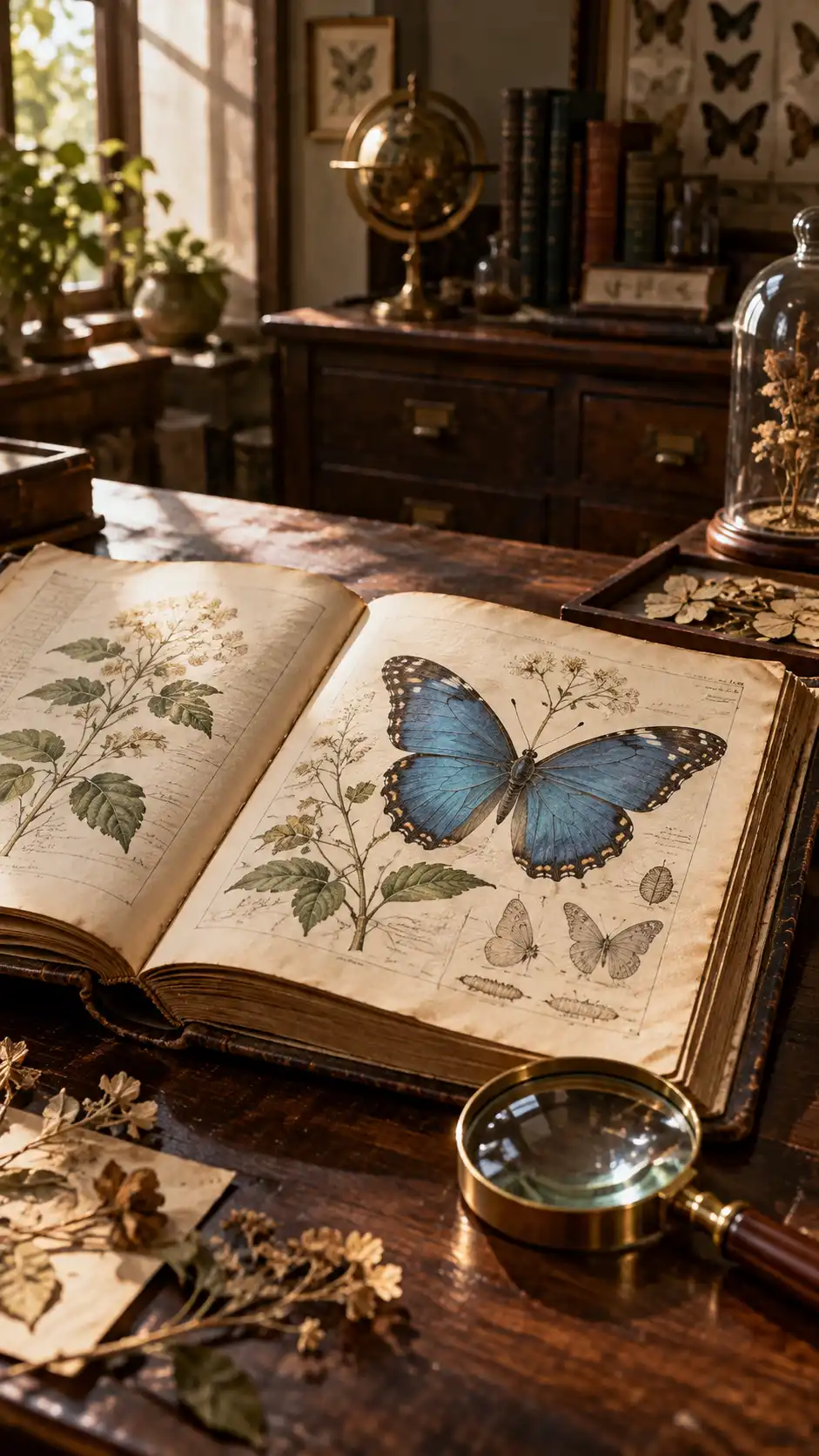
What it does: Creates a strong visual hook by turning a flat illustration into something alive.
Best for: Art videos, visual experiments, AI Reels, and creative accounts.
Watch out: Let the butterfly move, not the entire encyclopedia. If every plant suddenly comes alive, you have accidentally switched genres.
5 Tips for Better AI Reels
First, make something happen early. Short-form video does not give you much time for setup, so avoid spending the first four seconds doing absolutely nothing before the subject finally moves.
Second, focus on one main motion. If the subject is already moving, the camera does not also need to orbit, zoom, tilt, and perform acrobatics.
Third, do not force cinematic camera movement into every Reel. A locked camera can look more premium than an unnecessary 360-degree orbit.
Fourth, let the idea determine the video length. A simple visual transformation may only need 5–8 seconds. Just because the model can generate 20 seconds does not mean you need to stretch a 6-second idea until it starts asking for retirement.
Finally, pay attention to the Ending Frame. Let the action finish cleanly before the clip ends. This makes the video easier to loop, extend, edit, or connect to the next shot.
What Are AI Reels Actually Good For?
For creators and marketers, one of the biggest benefits of AI Reels is not simply “making videos without filming.” It is testing creative ideas faster.
You can try paper animation today, a miniature sci-fi story tomorrow, and an atmospheric character-free video the day after that. If one direction performs well, build more around it. If another idea goes nowhere, move on without renting a studio, finding actors, building a set, and discovering afterward that nobody cared.
That is the real advantage of create reels with AI workflows: they do not guarantee that every video will go viral. They simply make experimentation faster and cheaper.
And that matters. If adding the word “viral” to a prompt were enough to get a million views, none of us would still be studying SEO.
Start Creating Your First AI Reel
Your first AI Reel does not need a complicated story. Start with one simple change: bring an old photo to life, animate an illustration, create a subtle atmospheric shift, or make something happen that would be difficult to film in real life.
Remember the workflow: Idea → Visual → Motion → Generate → Review → Publish.
If you already have an image, use Movmix AI Image to Video to turn it into a short video. If you do not have visual material yet, start with AI Text to Image and build your Key Visual first.
A good Reel does not need a lot to happen. It just needs one idea worth watching come to life.
'%3e%3crect%20y='2.1906'%20width='26'%20height='17.4314'%20rx='1.55981'%20fill='white'/%3e%3c/g%3e%3crect%20x='0.311961'%20y='2.50256'%20width='25.3761'%20height='16.8075'%20rx='1.24784'%20stroke='%2322257C'%20stroke-width='0.623922'/%3e%3c/g%3e%3crect%20x='13.078'%20y='15.5656'%20width='10.8016'%20height='2.49569'%20rx='0.623922'%20fill='%2366B3FF'%20stroke='%2322257C'%20stroke-width='0.623922'/%3e%3crect%20x='-0.311961'%20y='0.311961'%20width='10.8016'%20height='2.49569'%20rx='0.623922'%20transform='matrix(-1%200%200%201%2012.61%2015.2536)'%20fill='%2366B3FF'%20stroke='%2322257C'%20stroke-width='0.623922'/%3e%3crect%20x='10.3093'%20y='13.3231'%20width='4.91339'%20height='6.98013'%20rx='2.45669'%20fill='%2322257C'/%3e%3cpath%20d='M18.9174%200.31543C20.5962%200.268025%2022.1261%200.655527%2023.9487%201.55762C24.0483%201.60695%2024.1137%201.71153%2024.1137%201.8291V16.502C24.1137%2016.7236%2023.8763%2016.891%2023.6499%2016.7979C21.803%2016.0377%2020.2158%2015.6963%2018.4975%2015.7705C16.8915%2015.8399%2015.1907%2016.2732%2013.0776%2017.0332V1.6709C15.4678%200.825877%2017.2746%200.36187%2018.9174%200.31543Z'%20fill='white'%20stroke='%2322257C'%20stroke-width='0.623922'/%3e%3cpath%20d='M15.3008%204.57C16.3536%203.94578%2019.2783%203.20503%2021.8909%203.94608'%20stroke='%2366B3FF'%20stroke-width='0.935883'%20stroke-linecap='round'/%3e%3cpath%20d='M15.3008%207.26054C16.3536%206.63631%2019.2783%205.89557%2021.8909%206.63661'%20stroke='%2366B3FF'%20stroke-width='0.935883'%20stroke-linecap='round'/%3e%3cpath%20d='M15.3008%209.95107C16.3536%209.32684%2019.2783%208.5861%2021.8909%209.32714'%20stroke='%2366B3FF'%20stroke-width='0.935883'%20stroke-linecap='round'/%3e%3cpath%20d='M15.3008%2012.6398C16.3536%2012.0156%2019.2783%2011.2749%2021.8909%2012.0159'%20stroke='%2366B3FF'%20stroke-width='0.935883'%20stroke-linecap='round'/%3e%3cpath%20d='M7.08257%200.31543C5.40384%200.268025%203.87393%200.655527%202.05132%201.55762C1.95165%201.60695%201.88628%201.71153%201.88628%201.8291V16.502C1.88628%2016.7236%202.12373%2016.891%202.35014%2016.7979C4.19702%2016.0377%205.78418%2015.6963%207.50249%2015.7705C9.10852%2015.8399%2010.8093%2016.2732%2012.9224%2017.0332V1.6709C10.5322%200.825877%208.72541%200.36187%207.08257%200.31543Z'%20fill='white'%20stroke='%2322257C'%20stroke-width='0.623922'/%3e%3cpath%20d='M10.6992%204.57C9.64638%203.94578%206.72175%203.20503%204.10907%203.94608'%20stroke='%2366B3FF'%20stroke-width='0.935883'%20stroke-linecap='round'/%3e%3cpath%20d='M10.6992%207.26054C9.64638%206.63631%206.72175%205.89557%204.10907%206.63661'%20stroke='%2366B3FF'%20stroke-width='0.935883'%20stroke-linecap='round'/%3e%3cpath%20d='M10.6992%209.95107C9.64638%209.32684%206.72175%208.5861%204.10907%209.32714'%20stroke='%2366B3FF'%20stroke-width='0.935883'%20stroke-linecap='round'/%3e%3cpath%20d='M10.6992%2012.6398C9.64638%2012.0156%206.72175%2011.2749%204.10907%2012.0159'%20stroke='%2366B3FF'%20stroke-width='0.935883'%20stroke-linecap='round'/%3e%3c/g%3e%3cdefs%3e%3cfilter%20x='0'%20y='2.1906'%20width='26'%20height='17.4314'%20filterUnits='userSpaceOnUse'%20color-interpolation-filters='sRGB'%3e%3cfeFlood%20flood-opacity='0'%20result='BackgroundImageFix'/%3e%3cfeBlend%20mode='normal'%20in='SourceGraphic'%20in2='BackgroundImageFix'%20result='shape'/%3e%3cfeColorMatrix%20in='SourceAlpha'%20type='matrix'%20values='0%200%200%200%200%200%200%200%200%200%200%200%200%200%200%200%200%200%20127%200'%20result='hardAlpha'/%3e%3cfeOffset%20dy='-1.24784'/%3e%3cfeComposite%20in2='hardAlpha'%20operator='arithmetic'%20k2='-1'%20k3='1'/%3e%3cfeColorMatrix%20type='matrix'%20values='0%200%200%200%200.572549%200%200%200%200%200.768627%200%200%200%200%200.976471%200%200%200%201%200'/%3e%3cfeBlend%20mode='normal'%20in2='shape'%20result='effect1_innerShadow_0_4'/%3e%3c/filter%3e%3c/defs%3e%3c/svg%3e)



