

Have you ever watched a great video and thought:
What if I could replace the main character without changing everything else?
Imagine finding a basketball video with great movement, camera work, and composition. You like the performance, but you want your own character to appear in it instead.
Traditionally, that could involve reshooting the scene, masking, motion matching, and extensive editing.
With character changer AI, there's another approach: use an existing video as the motion reference while providing a separate image to define the new character's appearance.
That's exactly what we're going to explore in this tutorial.
Change the character, not the entire video.
We'll use Movmix Reference to Video to combine a character image with a motion reference, then walk through how to reduce common problems such as changing faces, inaccurate movements, and unstable backgrounds.
The goal isn't simply to generate an attractive new video. It's to preserve as much of the original performance as possible while changing who performs it.
1. What Does Character Changer AI Actually Change?
First, let's clear up a common misunderstanding.
Character changing isn't the same as face swapping.
Face swapping focuses mainly on replacing facial appearance. Character replacement involves a broader visual change, potentially including the character's hairstyle, clothing, overall appearance, and identity.
| AI Workflow | What It Changes |
|---|---|
| Face Swap | Facial appearance |
| Character Changer | Overall character appearance and identity |
| Video Style Transfer | The video's visual style |
| Reference to Video | Uses reference materials to guide appearance, movement, or composition |
For example, imagine you already have a basketball video.
You want to replace the original player with another character, but you don't want to redesign the basketball court or completely change the dribbling sequence.
This requires two different reference materials.
In simple terms:
Image A decides who performs. Video B decides how they move.
That distinction is the foundation of the entire workflow.
2. Full Tutorial: Replace a Basketball Player With a New Character
Instead of showing ten unrelated prompts, let's complete one practical Before / After example.
We'll use a basketball video with clear movements and a stable indoor background.
Our objective is straightforward:
Replace the original player wearing a red jersey and black shorts with the character from Image A, who wears a black sleeveless sports top and white shorts.
The original dribbling motion and basketball court should remain as consistent as possible.
Step 1: Prepare the New Character Reference
Start with an image of the character you want to appear in the final video.
For full character replacement, choose an image that clearly shows the face, hairstyle, clothing, and overall proportions.
If you don't already have a suitable image, you can prepare one using Movmix's image-generation tools.
| Character Reference Prompt | Output |
|---|---|
| 16:9 horizontal composition, a European-looking basketball player with short dark brown curly hair and clearly defined facial features, wearing a black sleeveless sports top, white basketball shorts, and white basketball shoes. The player stands naturally inside a bright modern indoor basketball court, facing the camera, legs slightly apart, arms naturally relaxed. Full body clearly visible, sharp facial details, realistic commercial sports photography, medium-long shot, centered composition, both feet fully visible within the frame, no text, no logo, no watermark. | 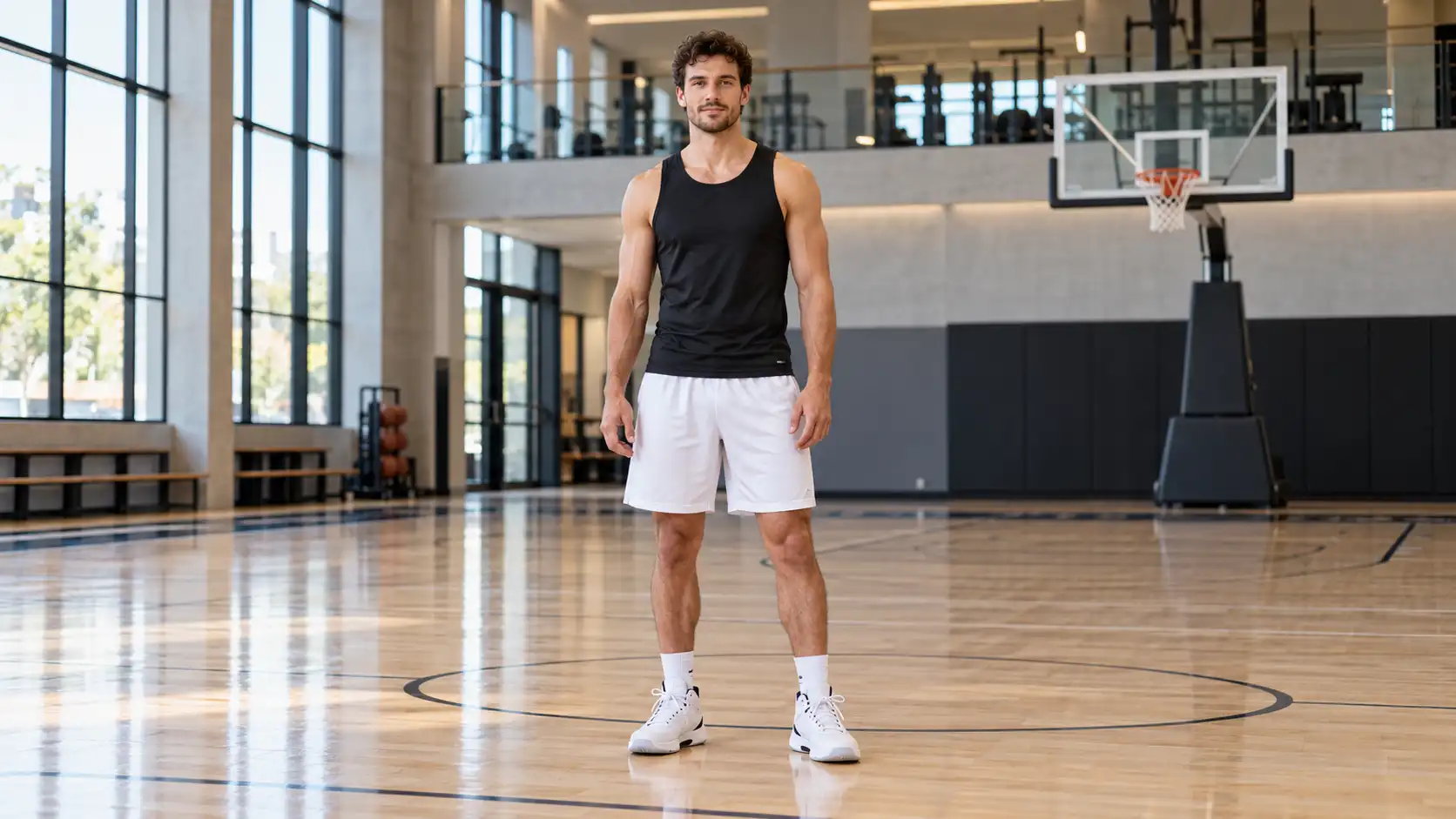 |
If you're working with an existing portrait, you can also use Movmix Image to Image to adjust the clothing or background before moving into video generation.
One important detail: your reference image doesn't need to show a complicated basketball movement.
At this stage, establishing a clear and consistent character appearance is more important.
Step 2: Prepare the Original Basketball Video
Next, prepare Video B.
This is the existing basketball clip containing the movement we want the new character to perform.
For a more controlled result, choose footage with one clearly visible main player, relatively stable framing, recognizable ball movement, and minimal obstruction.
If you don't already have a suitable reference video, you can generate a simple dribbling clip first.
Video B is our motion reference. Its job is to establish the movement, timing, framing, and environment.
Step 3: Upload Both References to Movmix
Open Movmix Reference to Video and choose an available model that supports the required image and video reference inputs.
Prepare your materials as follows:
| Input | Material | Purpose |
|---|---|---|
| Image A | Black top + white shorts | Defines the new character |
| Video B | Red jersey + black shorts | Provides the original movement |
| Video Prompt | Replacement instructions | Explains what changes and what stays |
Check the input requirements of your selected model before generating.
At this point, you might be tempted to write:
Replace the person in the video with the person in the image.
That communicates the general idea, but it leaves several important decisions to the model.
Should it preserve the original clothing? Should the camera change? Does the environment need to remain the same?
For character replacement, those details matter.
Step 4: Write the Character Replacement Prompt
Rather than describing how beautiful the basketball court looks, focus on assigning clear roles to the references.
Character Replacement Video Prompt:
Use Image A as the appearance and identity reference for the final character. Replace the player wearing the red jersey in Video B with the character from Image A. Preserve the character's facial features, short dark brown curly hair, black sleeveless sports top, white basketball shorts, white basketball shoes, and overall proportions from Image A. Strictly follow the dribbling rhythm, shifts in center of gravity, arm movements, footwork, and basketball trajectory shown in Video B. Make the new character perform the same sequence of movements. Preserve the original camera angle, composition, basketball court layout, lighting, and background from Video B. The final video must feature only the character from Image A. Do not retain the original player's appearance or clothing from Video B. Keep the interaction with the basketball natural and physically consistent. Do not introduce additional characters or objects.
This prompt separates the task into three specific instructions:
| What Needs to Be Controlled | Reference Source |
|---|---|
| Face, hairstyle, clothing, and character identity | Image A |
| Dribbling, footwork, and movement timing | Video B |
| Camera angle, court, lighting, and background | Video B |
This is much more precise than repeatedly asking the model to make the new video look exactly like the original.
Step 5: Generate and Review the Result
When reviewing the generated video, don't focus only on whether the new character looks correct.
Check the original movement too.
Does the player still dribble twice before switching hands? Is the sideways movement preserved? Does the basketball follow a believable trajectory? Has the background changed unexpectedly?
A successful character replacement should preserve the purpose of the original video, not simply produce a different-looking person.
3. Why Does AI Character Replacement Sometimes Go Wrong?
Your first generation might not be perfect.
Perhaps the new character appears correctly at the beginning but gradually changes appearance. Maybe the outfit is correct, but the dribbling movement no longer matches the original.
Instead of rewriting the entire prompt, identify the specific problem first.
Problem 1: The New Character's Face Keeps Changing
What happens: The character looks correct at first, but facial features gradually change during movement.
How to fix it: Check whether the character reference is clear and reduce unnecessary head rotation. Reinforce the appearance consistency requirements.
Additional Prompt:
Problem 2: The Movement Doesn't Match the Original Video
What happens: The reference shows two dribbles and a small sideways movement, but the generated result introduces extra turns or unrelated actions.
How to fix it: Make Video B the explicit motion reference and remove unnecessary creative instructions.
Additional Prompt:
Problem 3: The Basketball Court Changes
What happens: The character is replaced successfully, but the floor, background, or court layout changes during generation.
How to fix it: Reinforce the requirement to inherit the original environment and camera from Video B.
Additional Prompt:
Problem 4: The Basketball Interaction Looks Unnatural
This problem involves more than visual appearance. The character's hands, basketball, and overall movement need to interact naturally.
If the original motion is particularly complicated, try testing a shorter, clearer reference clip first.
Reducing rapid obstructions and complicated interactions can make the result easier to control.
Fix one problem at a time. It's much easier to understand what actually improved the result.
4. How to Get More Consistent AI Character Replacement Results
A few practical habits can make the entire workflow easier to manage.
| Workflow Stage | Recommended Approach |
|---|---|
| Character reference | Use a clear image showing facial details, outfit, and full proportions |
| Original video | Keep the main subject easy to identify |
| Movement | Start with clear, continuous actions |
| Prompt structure | Separate character identity from motion reference |
| Environment | Explicitly define which background elements must remain unchanged |
| Result review | Check appearance, movement, and environment together |
If you're testing character replacement for the first time, begin with a simple movement rather than a complicated performance.
Once the character and motion look reasonably consistent, you can explore dance, more elaborate sports actions, or longer video sequences.
For commercial projects, make sure you have the appropriate rights or permissions to use the original images and footage.
5. What Can You Create With Character Changer AI?
Character replacement isn't limited to basketball videos.
Once you understand the workflow, you can apply it to other types of content.
| Use Case | Creative Possibility |
|---|---|
| Fashion | Replace the original model with another character |
| AI Dance | Make your original character follow reference choreography |
| Brand Videos | Recreate existing performances using a consistent brand character |
| Social Media | Reinterpret familiar movement clips with a different character |
| AI Short Films | Use character references to support identity consistency across scenes |
These scenarios share one important idea:
The original video already contains valuable movement information. You want to change who performs it.
That's what makes character replacement different from simply generating a video from a single image.
FAQ: Character Changer AI
Is character changer AI the same as AI face swap?
Not exactly. Face swapping focuses primarily on facial appearance, while character replacement can involve changing the overall character appearance, including hairstyle, clothing, proportions, and identity.
Can I keep the original movements when replacing a character?
You can use a compatible reference-video workflow to guide the generated movement and camera composition.
However, AI-generated results aren't guaranteed to match every original frame perfectly. Always review the action sequence, movement timing, and interactions with objects.
Do I need a full-body character reference image?
Not always, but a clear full-body image usually provides more useful visual information when replacing an entire character.
If you only upload a facial close-up, the model may need to interpret the missing clothing and appearance details.
Why does the final video still use the original character's outfit?
If you want the clothing to change too, explicitly instruct the model to use the outfit from Image A rather than preserving the original outfit from Video B.
Can I replace a realistic character with a cartoon character?
You can experiment with this approach, but it introduces additional challenges because character proportions, materials, and movement styles may differ significantly.
Starting with a simple reference motion can make the process easier to evaluate.
Final Thoughts: Change the Character Without Recreating Everything
In the past, when you found a video with a great performance, you might have needed to study its movement, camera work, and timing before attempting to recreate it.
With character changer AI, you can explore another workflow: combine a new character reference with an existing motion video.
The most important lesson from this tutorial isn't the basketball example itself.
It's understanding the role of each element:
Image A = Who
Video B = How
Prompt = What to change and what to preserve
Once you clearly separate these three responsibilities, creating a new version of an existing performance becomes much easier to approach.
Next time you find a motion clip that you'd like to recreate with your own original character, try Movmix Reference to Video and see how a new character can bring a different identity to the same performance.
'%3e%3crect%20y='2.1906'%20width='26'%20height='17.4314'%20rx='1.55981'%20fill='white'/%3e%3c/g%3e%3crect%20x='0.311961'%20y='2.50256'%20width='25.3761'%20height='16.8075'%20rx='1.24784'%20stroke='%2322257C'%20stroke-width='0.623922'/%3e%3c/g%3e%3crect%20x='13.078'%20y='15.5656'%20width='10.8016'%20height='2.49569'%20rx='0.623922'%20fill='%2366B3FF'%20stroke='%2322257C'%20stroke-width='0.623922'/%3e%3crect%20x='-0.311961'%20y='0.311961'%20width='10.8016'%20height='2.49569'%20rx='0.623922'%20transform='matrix(-1%200%200%201%2012.61%2015.2536)'%20fill='%2366B3FF'%20stroke='%2322257C'%20stroke-width='0.623922'/%3e%3crect%20x='10.3093'%20y='13.3231'%20width='4.91339'%20height='6.98013'%20rx='2.45669'%20fill='%2322257C'/%3e%3cpath%20d='M18.9174%200.31543C20.5962%200.268025%2022.1261%200.655527%2023.9487%201.55762C24.0483%201.60695%2024.1137%201.71153%2024.1137%201.8291V16.502C24.1137%2016.7236%2023.8763%2016.891%2023.6499%2016.7979C21.803%2016.0377%2020.2158%2015.6963%2018.4975%2015.7705C16.8915%2015.8399%2015.1907%2016.2732%2013.0776%2017.0332V1.6709C15.4678%200.825877%2017.2746%200.36187%2018.9174%200.31543Z'%20fill='white'%20stroke='%2322257C'%20stroke-width='0.623922'/%3e%3cpath%20d='M15.3008%204.57C16.3536%203.94578%2019.2783%203.20503%2021.8909%203.94608'%20stroke='%2366B3FF'%20stroke-width='0.935883'%20stroke-linecap='round'/%3e%3cpath%20d='M15.3008%207.26054C16.3536%206.63631%2019.2783%205.89557%2021.8909%206.63661'%20stroke='%2366B3FF'%20stroke-width='0.935883'%20stroke-linecap='round'/%3e%3cpath%20d='M15.3008%209.95107C16.3536%209.32684%2019.2783%208.5861%2021.8909%209.32714'%20stroke='%2366B3FF'%20stroke-width='0.935883'%20stroke-linecap='round'/%3e%3cpath%20d='M15.3008%2012.6398C16.3536%2012.0156%2019.2783%2011.2749%2021.8909%2012.0159'%20stroke='%2366B3FF'%20stroke-width='0.935883'%20stroke-linecap='round'/%3e%3cpath%20d='M7.08257%200.31543C5.40384%200.268025%203.87393%200.655527%202.05132%201.55762C1.95165%201.60695%201.88628%201.71153%201.88628%201.8291V16.502C1.88628%2016.7236%202.12373%2016.891%202.35014%2016.7979C4.19702%2016.0377%205.78418%2015.6963%207.50249%2015.7705C9.10852%2015.8399%2010.8093%2016.2732%2012.9224%2017.0332V1.6709C10.5322%200.825877%208.72541%200.36187%207.08257%200.31543Z'%20fill='white'%20stroke='%2322257C'%20stroke-width='0.623922'/%3e%3cpath%20d='M10.6992%204.57C9.64638%203.94578%206.72175%203.20503%204.10907%203.94608'%20stroke='%2366B3FF'%20stroke-width='0.935883'%20stroke-linecap='round'/%3e%3cpath%20d='M10.6992%207.26054C9.64638%206.63631%206.72175%205.89557%204.10907%206.63661'%20stroke='%2366B3FF'%20stroke-width='0.935883'%20stroke-linecap='round'/%3e%3cpath%20d='M10.6992%209.95107C9.64638%209.32684%206.72175%208.5861%204.10907%209.32714'%20stroke='%2366B3FF'%20stroke-width='0.935883'%20stroke-linecap='round'/%3e%3cpath%20d='M10.6992%2012.6398C9.64638%2012.0156%206.72175%2011.2749%204.10907%2012.0159'%20stroke='%2366B3FF'%20stroke-width='0.935883'%20stroke-linecap='round'/%3e%3c/g%3e%3cdefs%3e%3cfilter%20x='0'%20y='2.1906'%20width='26'%20height='17.4314'%20filterUnits='userSpaceOnUse'%20color-interpolation-filters='sRGB'%3e%3cfeFlood%20flood-opacity='0'%20result='BackgroundImageFix'/%3e%3cfeBlend%20mode='normal'%20in='SourceGraphic'%20in2='BackgroundImageFix'%20result='shape'/%3e%3cfeColorMatrix%20in='SourceAlpha'%20type='matrix'%20values='0%200%200%200%200%200%200%200%200%200%200%200%200%200%200%200%200%200%20127%200'%20result='hardAlpha'/%3e%3cfeOffset%20dy='-1.24784'/%3e%3cfeComposite%20in2='hardAlpha'%20operator='arithmetic'%20k2='-1'%20k3='1'/%3e%3cfeColorMatrix%20type='matrix'%20values='0%200%200%200%200.572549%200%200%200%200%200.768627%200%200%200%200%200.976471%200%200%200%201%200'/%3e%3cfeBlend%20mode='normal'%20in2='shape'%20result='effect1_innerShadow_0_4'/%3e%3c/filter%3e%3c/defs%3e%3c/svg%3e)



