
You've already created a video. The subject looks great, the movement works, and the camera angle is exactly what you wanted.
But visually? It still feels a little ordinary.
What if you could turn a realistic greenhouse video into a dreamy watercolor animation?
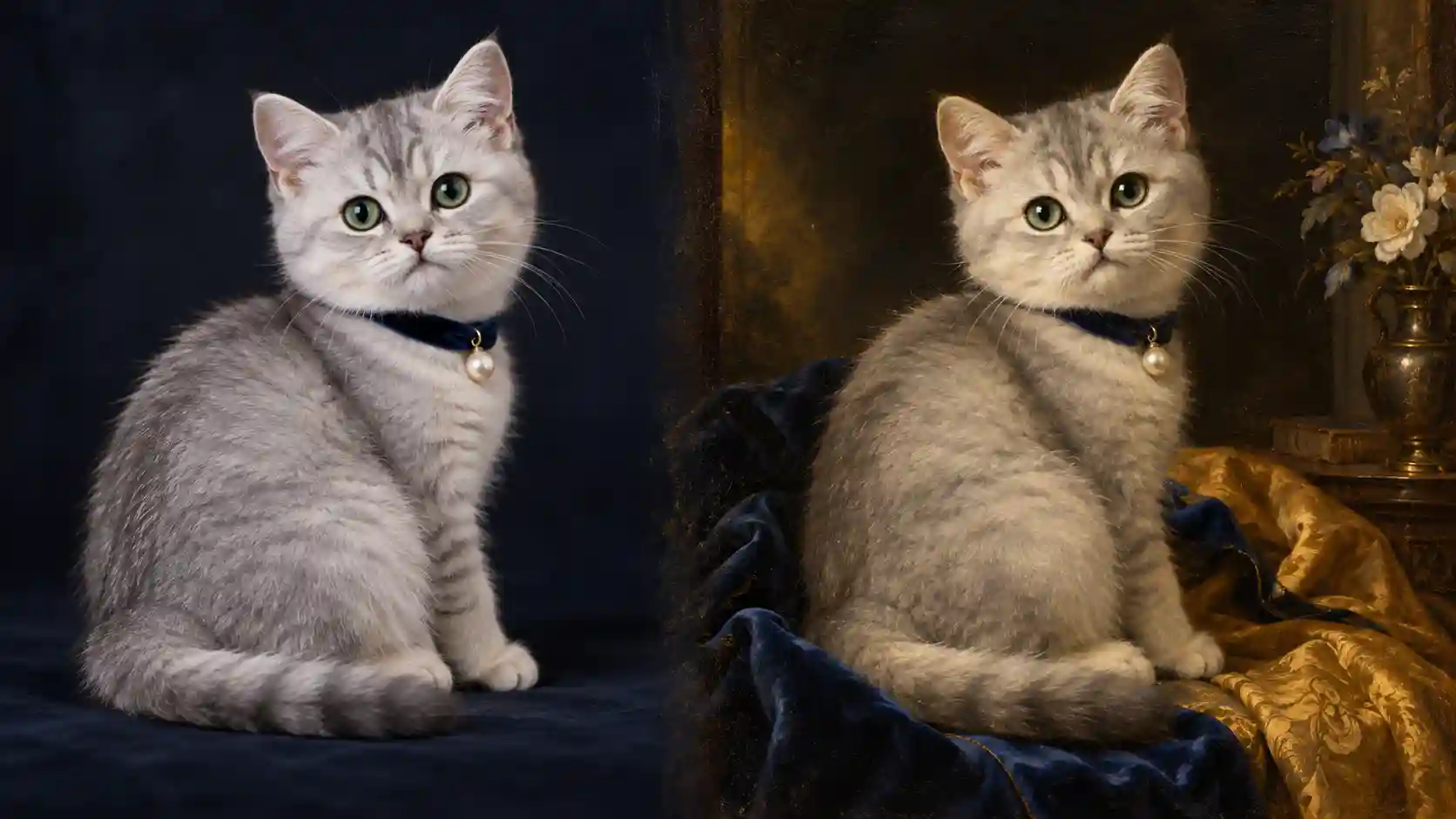
Or transform an adorable kitten into the star of a classical oil painting, complete with the lighting and artistic atmosphere of Girl with a Pearl Earring?
What about turning a real bakery commercial into a charming clay-animation scene?
That's where AI video style transfer comes in.
With Movmix AI Video Editor, you can explore video editing workflows that use existing footage as the starting point and apply creative changes through prompts, depending on the capabilities of the selected model.
Unlike a standard Image to Video workflow, we're not starting from a single image and generating an entirely new motion sequence.
Instead, our objective is to preserve the original subject, movement, and camera timing as closely as possible while changing the video's artistic style.
In this guide, we'll explore three visually distinctive examples of AI transformation videos:
- A realistic greenhouse transformed into watercolor animation.
- A silver-gray kitten transformed into a classic Dutch oil painting.
- A bakery commercial transformed into handcrafted clay animation.
Each example includes a reference image prompt, an original video prompt, and a style transformation prompt.
1. What Is AI Video Style Transfer?
AI Video Style Transfer is a creative process that uses AI to reinterpret existing footage in a different visual style.
For example, you can experiment with transforming realistic videos into:
- Soft watercolor animation.
- Classical European oil paintings.
- Handcrafted clay stop-motion animation.
- Expressive 2D illustrations.
- Artistic films with distinctive textures and materials.
This is different from simply applying a conventional video filter.
A standard filter typically adjusts elements such as brightness, contrast, or color.
AI style transfer can go further by reinterpreting the video's textures, outlines, materials, shadows, and overall rendering style.
For instance, the realistic fur of a kitten can become delicate oil painting brushstrokes. A real croissant can take on the soft, handcrafted appearance of a miniature clay model.
However, changing the artistic style doesn't mean everything in the original video should change.
| What to Preserve | What Can Change |
|---|---|
| Original subject and recognizable features | Artistic rendering style |
| Original action sequence | Surface textures and materials |
| Camera movement direction | Colors and lighting style |
| Positions of important objects | Brushstrokes and outlines |
| Spatial layout of the scene | Overall artistic atmosphere |
Good style transfer isn't just about changing a video's colors. It's about giving the same footage an entirely new visual language.
2. What Makes a Good Source Video for Style Transfer?
You don't necessarily need to generate a new video.
If you already have footage you're happy with, you can use it as the starting point.
However, for your first experiment, I recommend choosing a short clip with a clearly visible subject, simple movement, a stable camera, and minimal obstruction.
Here's what we'll use in this tutorial:
| Original Video | Target Style | Main Learning Point |
|---|---|---|
| Bright glass greenhouse | Watercolor animation | Changing the overall material and painting style |
| Silver-gray kitten portrait | Classic Dutch oil painting | Preserving the subject's appearance and original movement |
| Bakery product showcase | Clay stop-motion animation | Changing object materials while preserving the scene layout |
All three examples are designed around 6-second original video clips, making it easier to compare the footage before and after transformation.
If you don't have existing footage, you can first create the source material with Movmix AI Image to Video.
Each example below includes the prompts needed to recreate the complete workflow.
3. Example 1: Turn a Real Greenhouse Video Into Watercolor Animation
Learning focus: Change the artistic materials while preserving the original environmental movement.
Our first example features a bright glass greenhouse.
In the original footage, sunlight enters through the glass roof while green plants and a few pale-yellow flowers move gently in the breeze.
After transformation, the entire environment takes on delicate watercolor brushstrokes, soft colors, and subtle paper textures, almost like a scene from an illustrated storybook.
Upload the original greenhouse video and use the following prompt:
Transform the uploaded realistic greenhouse video into refined hand-painted watercolor animation. Preserve the original glass greenhouse structure, plant positions, central stone pathway, camera angle, and complete motion timing. Reinterpret the realistic architectural and botanical materials as delicate watercolor brushstrokes, using soft green, pale-yellow, and warm ivory tones. Give the plants natural hand-drawn outlines, with subtle watercolor paper textures across the walls and flooring. Strictly preserve the original movement of the leaves and flowers. Do not change the plant varieties or positions, and do not add or remove major objects. Maintain a consistent watercolor painting style throughout every frame, without switching between realistic photography and hand-painted animation.
What it does: Transforms realistic greenhouse footage into warm watercolor animation while preserving the original gentle plant movement.
Best for: Art Films, Nature Videos, Creative Brand Visuals, Social Media Content.
Watch out: Don't simultaneously request changing greenhouse architecture, rapidly growing plants, or fast camera movement. The objective is to change the artistic presentation, not redesign the entire environment.
Key takeaway: Preserve the original scene and movement first, then transform the textures, brushstrokes, and colors.
4. Example 2: Turn an Adorable Kitten Into a Classic Oil Painting
Learning focus: Transform the artistic style while preserving the kitten's appearance and original movement.
Our second example takes a more playful approach to AI transformation videos.
The star is an adorable silver-gray short-haired kitten.
The original video uses realistic pet portrait photography. The kitten sits calmly against a dark background, with its body turned slightly sideways. It then slowly turns its head toward the camera.
We want to transform this footage into an artistic short film inspired by 17th-century Dutch portrait painting.
The visual inspiration comes from the famous masterpiece Girl with a Pearl Earring:
A dark background, deep blue and golden fabric accents, concentrated warm side lighting, luminous pearl highlights, and delicate classical oil painting brushstrokes.
But there's one important distinction.
We don't want the kitten to become the person depicted in the painting. We want the same kitten to become the subject of a classical oil portrait.
To establish a stronger visual connection between the original footage and the final painting, we'll incorporate a few subtle classical portrait elements into the original photograph.
At this stage, we don't want the image to look like an oil painting.
We want a realistic photograph that already includes a few classical portrait elements.
Style Transformation Prompt
Now comes the most interesting part.
We'll transform the entire realistic pet video into a classical oil painting while preserving the kitten's original head movement.
Transform the uploaded silver-gray kitten video into a classic 17th-century Dutch oil painting portrait, inspired by the artistic atmosphere of Girl with a Pearl Earring. Preserve the kitten's original silver-gray fur, green eyes, round face, upright ears, deep-blue neck accessory, small pearl pendant, and complete motion of slowly turning its head toward the camera. Reinterpret the realistic pet photography using delicate oil painting brushstrokes, soft transitions between light and shadow, and rich classical colors. Use a deep warm-black background with concentrated, gentle golden side lighting across the kitten's face. Render the blue and ochre fabrics with refined classical oil painting textures, allowing the pearl pendant to catch a natural luminous highlight. Preserve the kitten's original feline appearance. Do not transform it into a human figure or introduce new body structures. Strictly follow the original video's camera angle, head movement direction, and timing. Maintain a consistent classical oil painting style throughout the entire video without switching between realistic photography and painted animation.
What it does: Transforms an ordinary kitten video into a moving oil portrait with the atmosphere of a classical museum painting.
Best for: Pet Content, Art-Themed Videos, Creative Social Media, Visual Experiments.
Watch out: The kitten must retain its original animal appearance. The goal is to borrow the painting's lighting, brushstrokes, color palette, and artistic atmosphere, not to replace the kitten with the human subject of the original artwork.
It's also better to keep the head movement subtle. A smaller movement range can make it easier to maintain consistent facial features and fur details throughout the transformation.
Key takeaway: When referencing a famous painting, you can borrow its lighting, composition, and rendering style without copying its original subject.
5. Example 3: Transform a Real Bakery Video Into Clay Stop-Motion Animation
Learning focus: Change the appearance of materials while preserving the original scene layout and camera movement.
Our third example explores a completely different visual direction.
We'll start with a warm bakery commercial.
A golden croissant sits on a display counter while the camera slowly moves closer, revealing its delicate flaky layers.
After transformation, the croissant, plate, and surrounding environment take on the appearance of handcrafted clay models.
The final result should resemble a charming miniature stop-motion film rather than realistic footage with a simple filter applied.
Style Transformation Prompt
Transform the uploaded realistic bakery video into refined handcrafted clay stop-motion animation. Preserve the original croissant, two smaller pastries, ceramic plate, wooden display counter, object count, and exact arrangement. Strictly follow the original slow camera push-in. Reinterpret the realistic pastries as miniature clay models with softly rounded edges and delicate handcrafted sculpting marks. Keep the croissant golden-yellow with its recognizable layered shape. Give the ceramic plate and bakery background the appearance of a detailed miniature clay set. Use warm, gentle colors and a charming handcrafted stop-motion film aesthetic. Preserve the original shapes and positions of every object. Nothing melts, moves independently, or changes quantity. Maintain the same clay-animation visual style across all consecutive frames.
What it does: Transforms realistic food footage into handcrafted clay stop-motion animation.
Best for: Food Content, Brand Animation, Creative Commercials, Social Media Videos.
Watch out: Avoid requesting flying pastries, melting food, or dramatic shape changes during the style transformation.
A stable camera push-in is already enough to showcase the new clay material and miniature details.
Key takeaway: Changing an object's visual material can completely transform the viewing experience without adding new actions.
6. How to Create AI Transformation Videos With Movmix
Although our three examples use different artistic styles, the general workflow remains similar.
Step 1: Prepare Your Original Video
Start with an existing video clip.
If you don't have footage ready, use the Reference Image Prompt and Video Prompt from one of the examples above to generate your source video.
For initial testing, a clip of approximately 6 seconds with a clear subject, simple action, and stable camera is a good starting point.
If you're working with footage from another source, make sure you have the appropriate permission to use it.
Step 2: Choose a Video Editing Model That Supports Your Task
Open Movmix AI Video Editor and choose a model that currently supports the required video input and editing workflow.
Upload your original footage.
The distinction here is important:
We're changing the artistic style of an existing video, not generating an entirely new motion sequence from a single image.
Supported inputs and editing capabilities may vary between models, so check the available options in the current interface.
Step 3: Define One Clear Target Style
Give each video a specific artistic direction.
| Original Video | Target Style |
|---|---|
| Realistic greenhouse | Hand-painted watercolor animation |
| Realistic kitten | Classical Dutch oil painting |
| Realistic pastries | Clay stop-motion animation |
Avoid asking for watercolor, comic-book shading, oil painting, and clay textures in the same transformation.
Start with one clearly defined artistic direction.
Step 4: Write Your Style Transformation Prompt
I recommend using this structure:
Preserve the original footage → Define the target style → Specify which movements to retain → Restrict unnecessary changes.
Here's a reusable template.
Transform the uploaded original video into [target artistic style]. Preserve [main subject, recognizable appearance details, important objects, and scene structure] from the original footage. Reinterpret the visual materials using [specific brushstrokes, textures, outlines, color palette, and lighting characteristics]. Strictly follow the original [subject movement, camera direction, and motion timing]. Maintain a consistent artistic style across all consecutive frames. Do not add or remove major objects, alter the subject's fundamental structure, change the action sequence, or redesign the scene layout.
For example, in our kitten transformation, don't simply write:
"Turn the kitten into a famous painting."
Be more specific:
Classical oil painting brushstrokes, a dark background, blue and golden fabrics, soft side lighting, pearl highlights, and preservation of the kitten's original appearance and head-turning movement.
That gives the model a much clearer creative target.
Step 5: Compare the Original and Transformed Videos
After generation, play the original video and transformed result side by side.
Check the following:
- Is the main subject still recognizable?
- Has the original movement been reasonably preserved?
- Does the camera follow a similar direction and rhythm?
- Is the artistic style consistent throughout the clip?
- Have important objects or background details changed unnecessarily?
For the classic kitten portrait, pay particular attention to whether the face, eyes, and ears remain consistent as the kitten turns its head.
7. Common AI Video Style Transfer Problems and How to Fix Them
Problem 1: The Artistic Style Keeps Changing Between Frames
For example, some frames in the kitten portrait have clear oil painting textures, while others suddenly return to realistic photography.
In this situation, reinforce the requirement for a consistent visual style.
Corrective Prompt:
Maintain a consistent classical oil painting portrait style throughout the entire video. Use the same delicate oil painting brushstrokes, dark background, soft warm-golden side lighting, and refined transitions between light and shadow across all consecutive frames. The kitten's fur, eyes, neck fabric, and surrounding environment must retain their painted appearance at all times. Do not alternate between realistic photography and oil painting.
Problem 2: The Original Motion Changes After Transformation
For example, the original kitten simply turns its head, but the transformed video introduces unrelated movements.
Corrective Prompt:
Strictly preserve the subject movement, motion direction, action sequence, and camera angle from the original video. Do not introduce additional actions. Only change the overall artistic style without redesigning the behavior or motion timing of the original footage.
Problem 3: The Main Subject Changes Appearance
Perhaps the original kitten has silver-gray fur, but its color changes dramatically after the oil painting transformation.
Clarify which visual characteristics must remain recognizable.
Corrective Prompt:
While changing the overall artistic style, preserve the original kitten's silver-gray fur, green eyes, round face, ear shape, and body proportions. Keep the deep-blue neck accessory and small pearl pendant in their original positions and appearance. Change only the brushstrokes, lighting, and material rendering. Do not redesign the subject.
Problem 4: The Video Flickers or Details Change Repeatedly
Complex movement in the original footage can make it more difficult for the transformed textures and details to remain stable.
Try testing with simpler footage and reducing unnecessary additional motion.
Corrective Prompt:
Maintain stable subject outlines, colors, materials, and background style across all consecutive frames. Avoid repeated changes in visual details. Strictly follow the original video's movement without introducing additional camera motion or environmental changes.
If your video also suffers from distorted subjects, unwanted camera movement, or other generation errors, explore our AI Video Generation Problems guide for more troubleshooting methods.
8. AI Video Style Transfer vs. Regular Video Filters
Both methods can change how a video looks, but their creative purposes and approaches are different.
| Comparison | Regular Video Filters | AI Video Style Transfer |
|---|---|---|
| Main Changes | Brightness, color, contrast | Textures, outlines, rendering style, overall appearance |
| Subject Structure | Usually preserves the original visual structure | Can reinterpret materials and visual details |
| Typical Results | Vintage color grading, black-and-white filters | Watercolor, classical oil painting, clay animation |
| Control Method | Presets and adjustable parameters | Original footage and style instructions |
| Main Purpose | Quickly adjust the video's appearance | Reinterpret footage in a different artistic style |
For example, applying a warmer color grade to a realistic pet video is generally a conventional filter adjustment.
But transforming the same kitten into a classical Dutch oil portrait—with painterly brushstrokes, dramatic lighting, and traditional oil painting textures—is a more extensive artistic transformation.
The appeal of AI transformation videos is that existing footage can take on a completely different artistic identity.
FAQ: AI Video Style Transfer
Does AI Video Style Transfer Have to Start With an Image?
No. You can work directly with existing video footage. If you don't have an original video yet, you can generate a short clip first and then apply the desired style transformation.
Will the Kitten Turn Into the Human Subject of the Original Painting?
That shouldn't be the intended result. You can explicitly instruct the model to preserve the kitten's original animal appearance while borrowing the classical painting's lighting, composition, colors, and brushstrokes.
Will the Original Movement Stay Exactly the Same After Transformation?
Style transfer can attempt to preserve the original movement and camera timing, but frame-by-frame reproduction isn't guaranteed. Results depend on the source footage, selected model, and prompt instructions.
Can I Turn a Regular Video Into Classical Oil Painting Animation?
You can experiment with video models that support this type of editing. Define the target painting's textures, lighting, colors, and overall atmosphere instead of using only a broad instruction such as "make it look like a famous painting."
Why Does My Transformed Video Flicker?
Flickering can occur when the original footage contains complicated motion, heavy occlusion, or visual details that change inconsistently between frames. Start with short clips featuring simple movement and a stable composition.
Can I Use AI Transformation Videos for Commercial Projects?
Commercial applications may be possible depending on your rights to the original footage and the terms of the service you're using. Always confirm that you have permission to use and transform any third-party source materials.
Final Thoughts: Give the Same Video a Completely New Artistic Identity
Creating an AI video style transfer project doesn't mean starting from scratch every time.
Sometimes, you already have a video with a clear subject, appealing movement, and a camera angle that works perfectly.
You simply want it to look different.
In our three examples:
The glass greenhouse became a warm, hand-painted watercolor animation.
The adorable kitten turned into a moving classical oil portrait through dramatic lighting and delicate painterly textures.
And the realistic bakery footage gained the charming appearance of handcrafted miniature clay animation.
Although these examples feature completely different subjects, they share one creative principle:
Preserve the original subject, movement, and composition as much as possible. Focus the transformation on the artistic style.
If your source footage is ready, visit Movmix AI Video Generator and select an available video editing workflow that supports your intended transformation.
Same Motion. New Style. A Completely Different Visual Experience.
'%3e%3crect%20y='2.1906'%20width='26'%20height='17.4314'%20rx='1.55981'%20fill='white'/%3e%3c/g%3e%3crect%20x='0.311961'%20y='2.50256'%20width='25.3761'%20height='16.8075'%20rx='1.24784'%20stroke='%2322257C'%20stroke-width='0.623922'/%3e%3c/g%3e%3crect%20x='13.078'%20y='15.5656'%20width='10.8016'%20height='2.49569'%20rx='0.623922'%20fill='%2366B3FF'%20stroke='%2322257C'%20stroke-width='0.623922'/%3e%3crect%20x='-0.311961'%20y='0.311961'%20width='10.8016'%20height='2.49569'%20rx='0.623922'%20transform='matrix(-1%200%200%201%2012.61%2015.2536)'%20fill='%2366B3FF'%20stroke='%2322257C'%20stroke-width='0.623922'/%3e%3crect%20x='10.3093'%20y='13.3231'%20width='4.91339'%20height='6.98013'%20rx='2.45669'%20fill='%2322257C'/%3e%3cpath%20d='M18.9174%200.31543C20.5962%200.268025%2022.1261%200.655527%2023.9487%201.55762C24.0483%201.60695%2024.1137%201.71153%2024.1137%201.8291V16.502C24.1137%2016.7236%2023.8763%2016.891%2023.6499%2016.7979C21.803%2016.0377%2020.2158%2015.6963%2018.4975%2015.7705C16.8915%2015.8399%2015.1907%2016.2732%2013.0776%2017.0332V1.6709C15.4678%200.825877%2017.2746%200.36187%2018.9174%200.31543Z'%20fill='white'%20stroke='%2322257C'%20stroke-width='0.623922'/%3e%3cpath%20d='M15.3008%204.57C16.3536%203.94578%2019.2783%203.20503%2021.8909%203.94608'%20stroke='%2366B3FF'%20stroke-width='0.935883'%20stroke-linecap='round'/%3e%3cpath%20d='M15.3008%207.26054C16.3536%206.63631%2019.2783%205.89557%2021.8909%206.63661'%20stroke='%2366B3FF'%20stroke-width='0.935883'%20stroke-linecap='round'/%3e%3cpath%20d='M15.3008%209.95107C16.3536%209.32684%2019.2783%208.5861%2021.8909%209.32714'%20stroke='%2366B3FF'%20stroke-width='0.935883'%20stroke-linecap='round'/%3e%3cpath%20d='M15.3008%2012.6398C16.3536%2012.0156%2019.2783%2011.2749%2021.8909%2012.0159'%20stroke='%2366B3FF'%20stroke-width='0.935883'%20stroke-linecap='round'/%3e%3cpath%20d='M7.08257%200.31543C5.40384%200.268025%203.87393%200.655527%202.05132%201.55762C1.95165%201.60695%201.88628%201.71153%201.88628%201.8291V16.502C1.88628%2016.7236%202.12373%2016.891%202.35014%2016.7979C4.19702%2016.0377%205.78418%2015.6963%207.50249%2015.7705C9.10852%2015.8399%2010.8093%2016.2732%2012.9224%2017.0332V1.6709C10.5322%200.825877%208.72541%200.36187%207.08257%200.31543Z'%20fill='white'%20stroke='%2322257C'%20stroke-width='0.623922'/%3e%3cpath%20d='M10.6992%204.57C9.64638%203.94578%206.72175%203.20503%204.10907%203.94608'%20stroke='%2366B3FF'%20stroke-width='0.935883'%20stroke-linecap='round'/%3e%3cpath%20d='M10.6992%207.26054C9.64638%206.63631%206.72175%205.89557%204.10907%206.63661'%20stroke='%2366B3FF'%20stroke-width='0.935883'%20stroke-linecap='round'/%3e%3cpath%20d='M10.6992%209.95107C9.64638%209.32684%206.72175%208.5861%204.10907%209.32714'%20stroke='%2366B3FF'%20stroke-width='0.935883'%20stroke-linecap='round'/%3e%3cpath%20d='M10.6992%2012.6398C9.64638%2012.0156%206.72175%2011.2749%204.10907%2012.0159'%20stroke='%2366B3FF'%20stroke-width='0.935883'%20stroke-linecap='round'/%3e%3c/g%3e%3cdefs%3e%3cfilter%20x='0'%20y='2.1906'%20width='26'%20height='17.4314'%20filterUnits='userSpaceOnUse'%20color-interpolation-filters='sRGB'%3e%3cfeFlood%20flood-opacity='0'%20result='BackgroundImageFix'/%3e%3cfeBlend%20mode='normal'%20in='SourceGraphic'%20in2='BackgroundImageFix'%20result='shape'/%3e%3cfeColorMatrix%20in='SourceAlpha'%20type='matrix'%20values='0%200%200%200%200%200%200%200%200%200%200%200%200%200%200%200%200%200%20127%200'%20result='hardAlpha'/%3e%3cfeOffset%20dy='-1.24784'/%3e%3cfeComposite%20in2='hardAlpha'%20operator='arithmetic'%20k2='-1'%20k3='1'/%3e%3cfeColorMatrix%20type='matrix'%20values='0%200%200%200%200.572549%200%200%200%200%200.768627%200%200%200%200%200.976471%200%200%200%201%200'/%3e%3cfeBlend%20mode='normal'%20in2='shape'%20result='effect1_innerShadow_0_4'/%3e%3c/filter%3e%3c/defs%3e%3c/svg%3e)



