
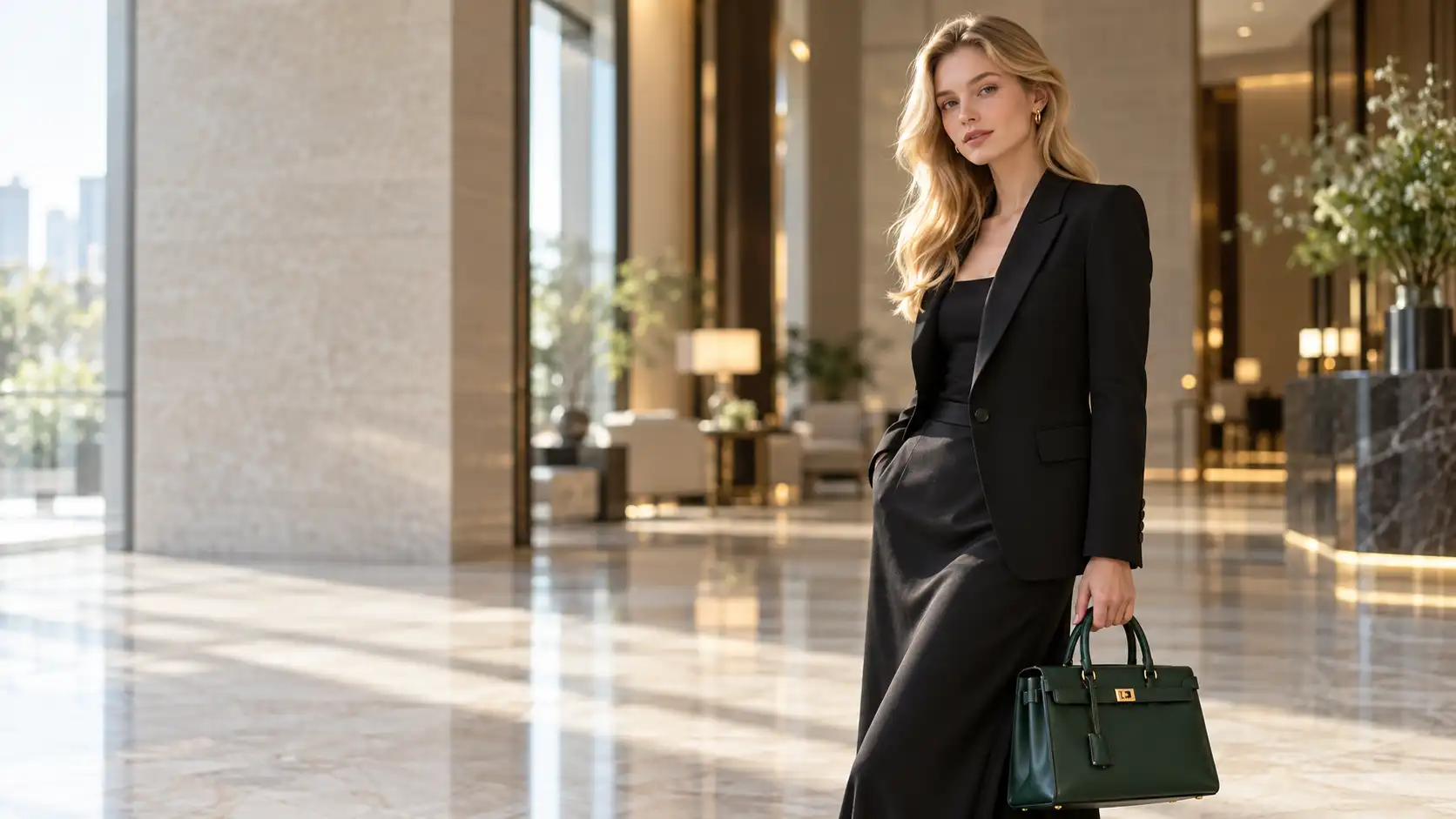
A good AI image prompt does not need to be extremely long.
For a model like Nano Banana 2.1, the more important question is whether the prompt clearly explains what should change, what should stay the same, and what the final image should look like.
This becomes especially useful for commercial visuals. Instead of generating random product images from scratch every time, you can use AI product photography prompts to build clean studio shots, move products into new environments, preserve reference objects, maintain the same character across scenes, or combine several reference images into one composition.
If you want to test these prompts directly, you can start with Movmix AI Text to Image.
Below are eight practical Nano Banana 2.1 prompts covering different image generation and editing workflows.
1. Luxury High Heel Product Photography
A strong product prompt should define the object, materials, composition, lighting, and what should not appear.
| Image Prompt | Output |
|---|---|
| 16:9 horizontal premium commercial product photography. A single black pointed-toe high heel is placed in the center of a pale beige travertine pedestal. Clearly show the full shoe silhouette, slim heel, pointed toe, leather surface, sole structure, and subtle metallic heel details. Use a minimal warm-gray studio background. Soft directional light enters from the upper left, creating delicate highlights along the black leather edges and a realistic soft contact shadow on the stone surface. Camera positioned slightly below the center height of the shoe, 85mm product photography lens, shallow depth of field, realistic leather, metal, and natural stone textures. High-end fashion advertising photography, clean composition, no people, no second shoe, no text, no logo, no watermark. | 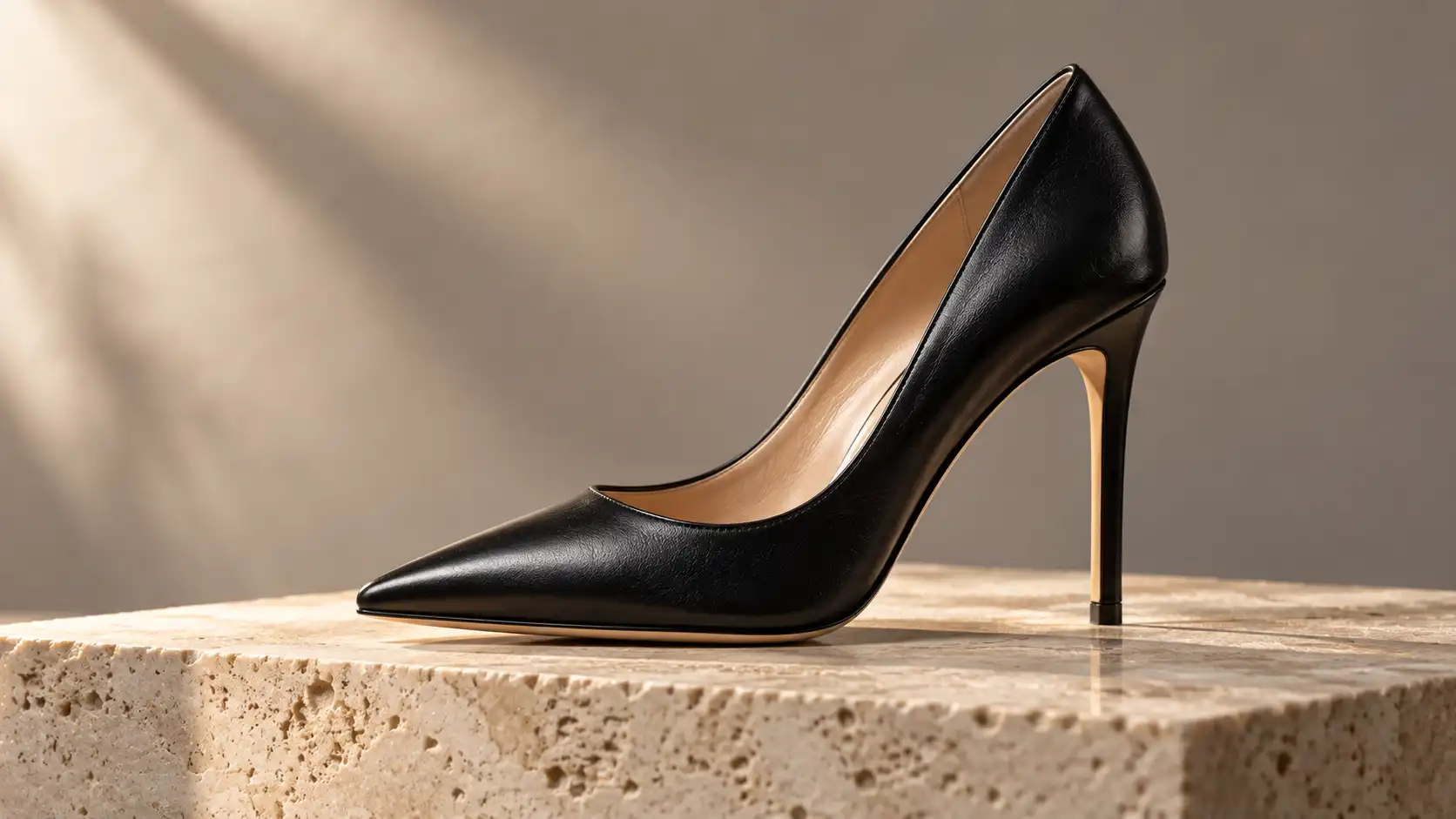 |
What it does:
Tests Nano Banana 2.1 with complex product silhouettes, leather materials, slim structures, and commercial lighting.
Best for:
Footwear campaigns, ecommerce images, fashion landing pages, and advertising concepts.
Watch out:
Check whether the heel remains straight, whether the sole connects naturally to the upper, and whether the model accidentally creates a second shoe.
2. Jewelry Background Replacement
Image editing becomes more difficult when the product contains many small details.
Jewelry is therefore a good test for product consistency.
| Reference Image | Editing Prompt | Output |
|---|---|---|
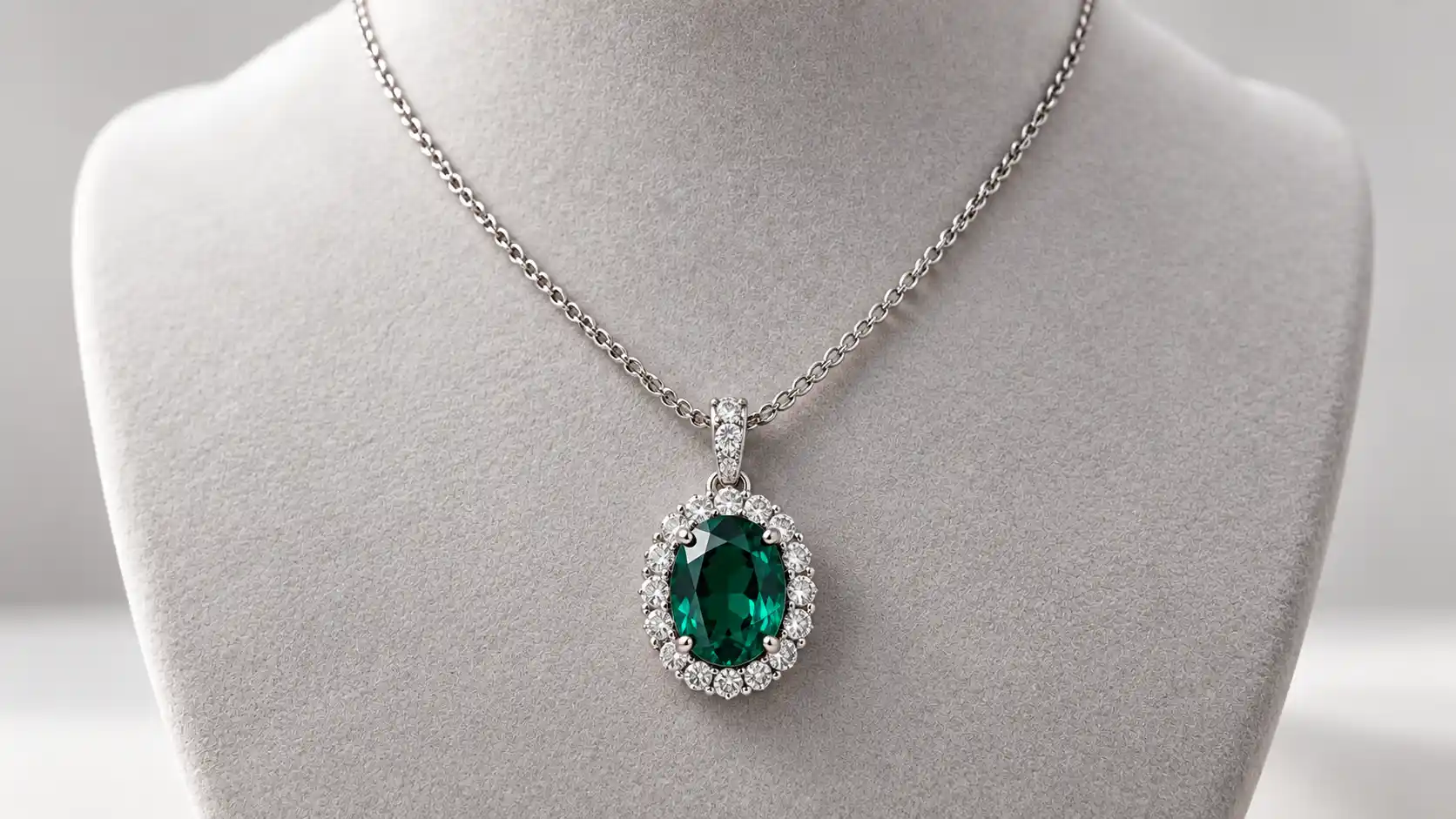 | Keep the silver necklace from the reference image unchanged, including the chain length and structure, the size and shape of the central oval deep-green gemstone, the surrounding transparent stones, the setting structure, and the silver metal color. Only replace the display environment. Replace the light-gray studio surface with a deep burgundy velvet jewelry display surface. The necklace should rest naturally on the soft velvet, with the central green gemstone still facing the camera. Create a refined luxury jewelry-store atmosphere in the background with only subtle blurred warm lights. Do not add any other jewelry. Regenerate realistic contact shadows, silver reflections, and gemstone refraction based on the new velvet surface and lighting. Do not redesign the necklace, change the gemstone color, add pendants, remove stones, modify the chain, or generate text. | 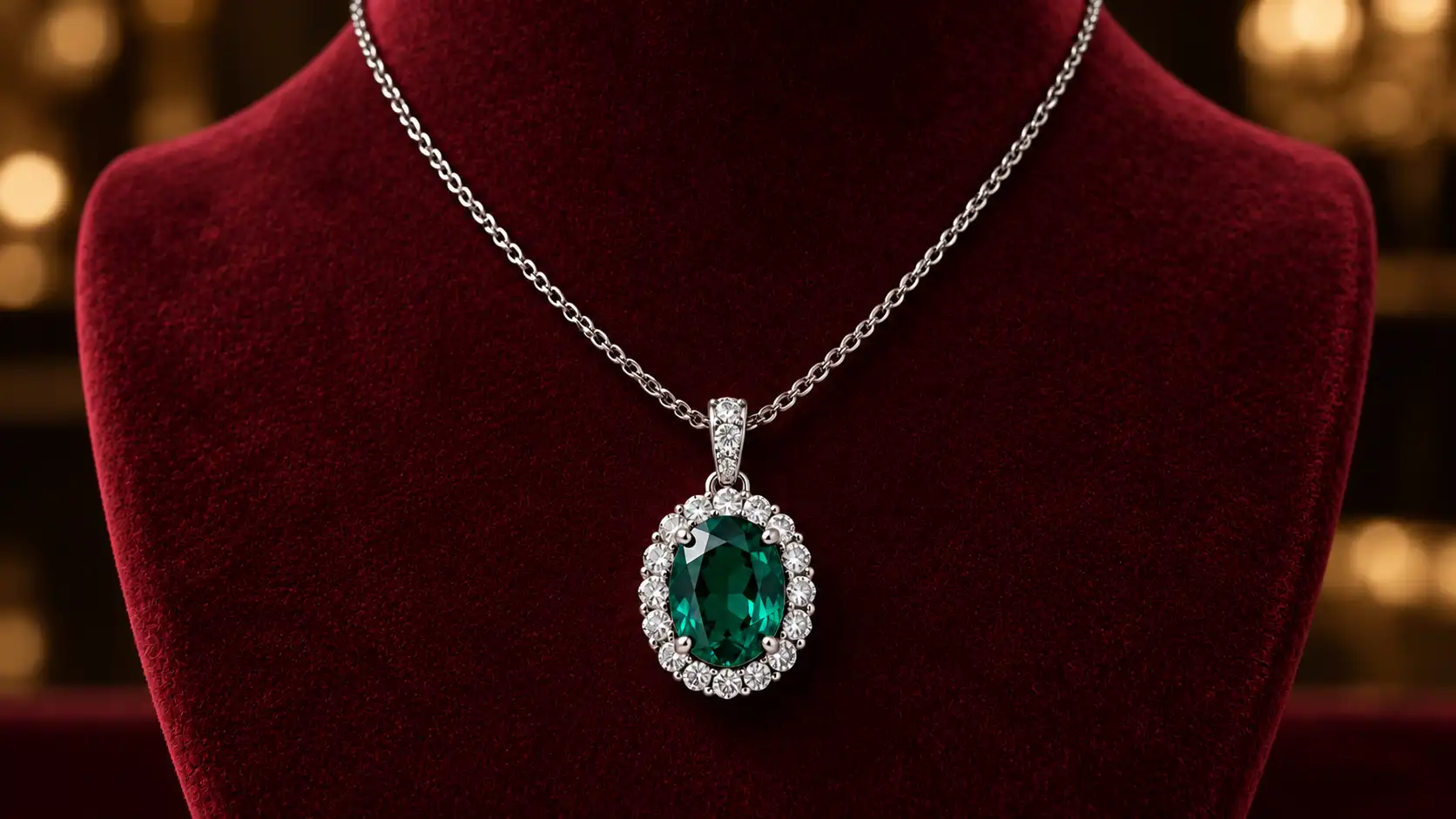 |
What it does:
Tests a typical background replacement prompt while preserving a detailed product.
Best for:
Jewelry campaigns, ecommerce product pages, holiday promotions, and luxury advertising.
Watch out:
Compare the gemstone count, pendant proportions, chain connections, and setting details with the original reference.
3. Turn a Studio Product Shot Into an Outdoor Campaign
A clean product photo does not always need to stay in a studio.
| Reference Image | Editing Prompt | Output |
|---|---|---|
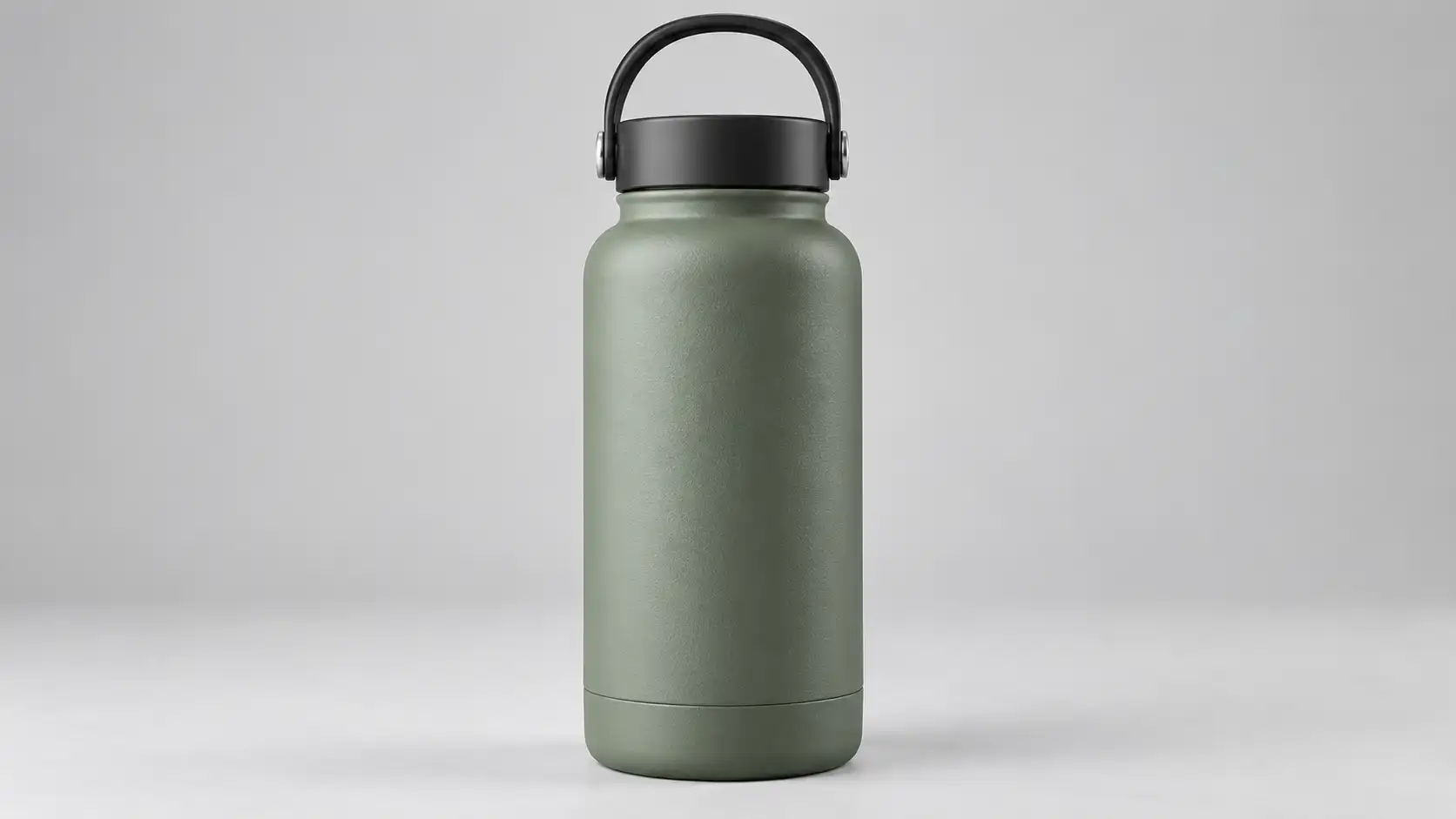 | Keep the matte sage gray-green metal insulated bottle completely unchanged, including its body proportions, rounded shape, black lid, black carrying handle, and refined matte brushed-metal surface. Only replace the environment. Place the bottle naturally on a light gray rough rock in an early-morning mountain camping scene. In the softly blurred background, show a forest, a valley, and a layer of morning mist. Soft golden morning sunlight enters from the rear left and creates a natural rim highlight along the bottle. Add a small amount of realistic dew on the rock surface. Maintain a premium outdoor lifestyle advertising look. Do not add people, do not redesign the product, and do not generate any text or logo. | 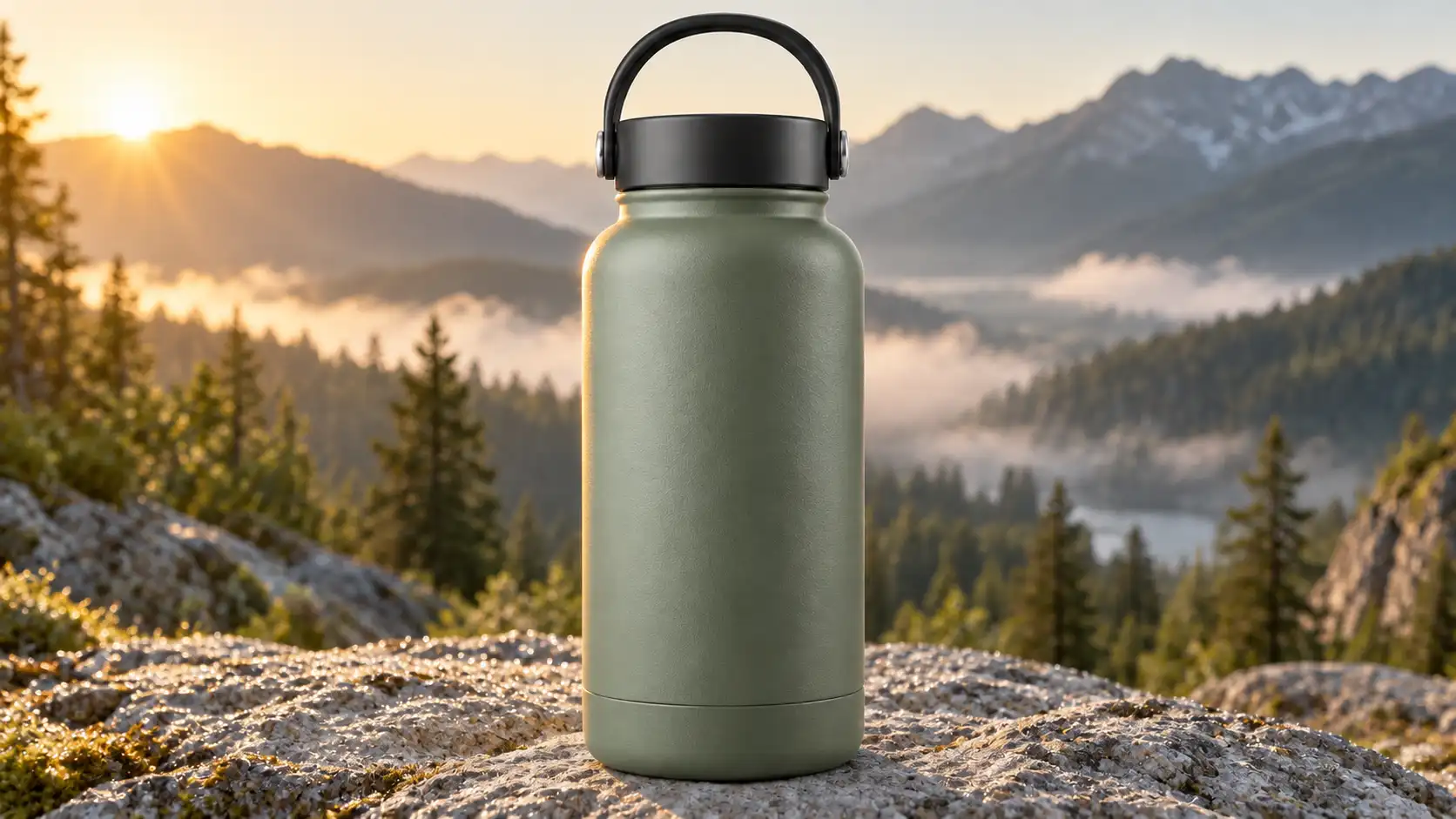 |
What it does:
Transforms a simple studio photo into a lifestyle advertising image.
Best for:
Outdoor products, travel campaigns, social ads, and lifestyle branding.
Watch out:
The more complex the new environment becomes, the more clearly you should state that the original product must remain unchanged.
4. Premium Food Product Photography
AI product photography prompts can also work well for food packaging and natural products.
| Image Prompt | Output |
|---|---|
| 16:9 horizontal premium commercial food photography. A clear glass bottle filled with natural honey stands in the center of a pale wooden table. The honey has a realistic warm amber color, with natural highlights along the edges of the glass bottle. Place a small amount of real honeycomb, a wooden honey dipper, and a few tiny white wildflowers beside the bottle. Keep the styling restrained and uncluttered. The background is a bright country kitchen with soft natural morning light entering through a window. Keep the background clearly out of focus. 85mm lens, shallow depth of field, realistic glass, honey, honeycomb, and wood textures, clean warm food advertising photography, no text, no logo, no watermark. | 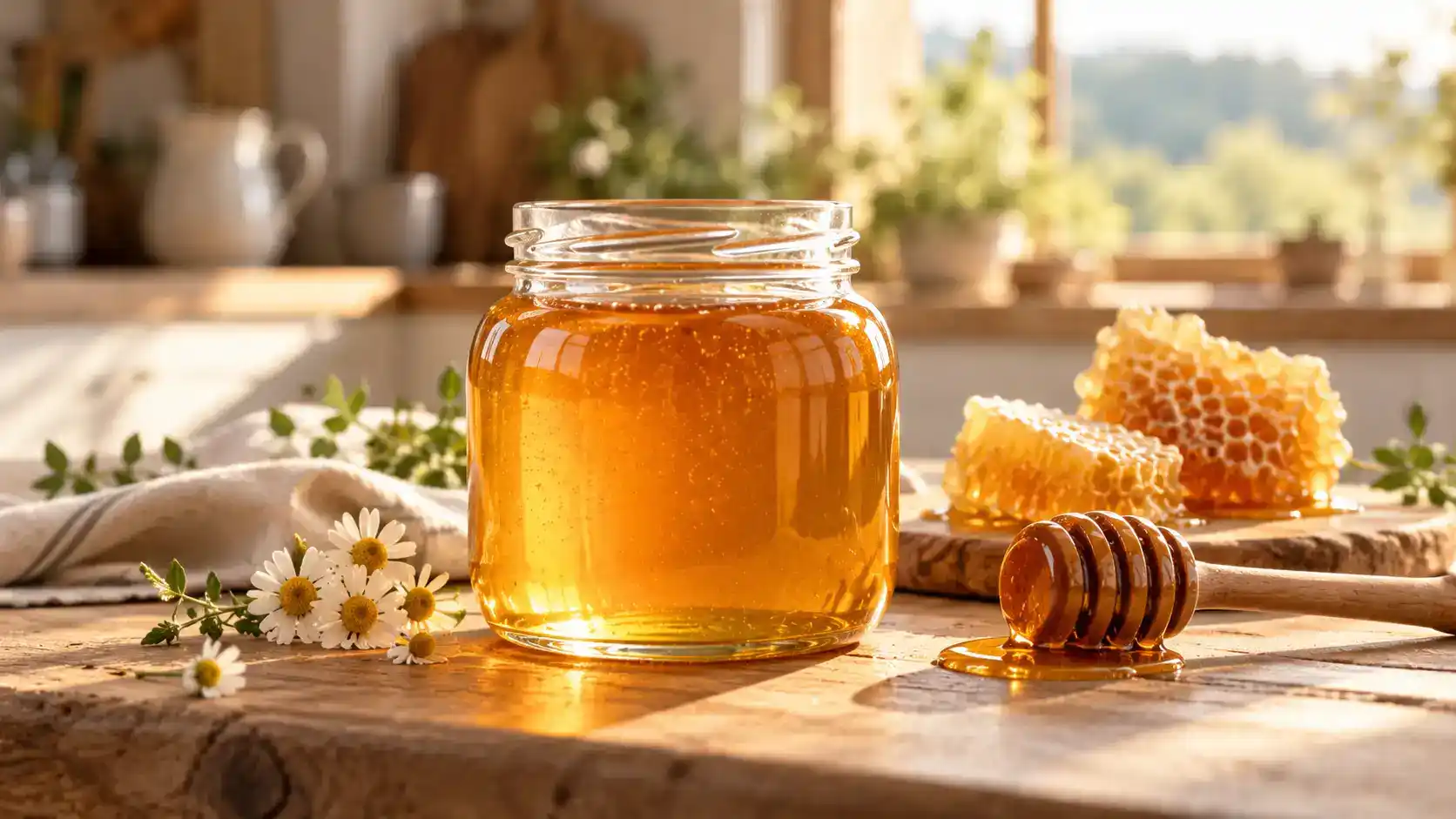 |
What it does:
Tests transparent materials, liquid appearance, food texture, and natural lighting.
Best for:
Food brands, packaging concepts, ecommerce visuals, and social campaigns.
Watch out:
Avoid unrealistic floating honey or exaggerated liquid splashes.
5. Create Multiple Campaign Scenes With the Same Product
One of the most useful product photo prompts is not generating one image—it is turning one product into an entire visual campaign.
Upload the same product reference and change only the environment.
Scene A — Modern Office
Keep the reference product completely unchanged, including its structure, color, proportions, materials, and design details.
Place the product on a minimal modern office desk. In the softly blurred background, show an architectural studio with large windows.
Use gentle natural morning light entering from the left. Clean, professional, contemporary commercial photography.
Scene B — Airport Lounge
Continue using exactly the same product without changing its structure, color, proportions, or design details.
Place the product on a small wooden table inside a modern airport lounge. Large windows in the background reveal a softly blurred airport apron.
Use subtle evening natural light and realistic premium travel lifestyle photography.
Scene C — Home Workspace
Keep the same product completely unchanged.
Place it on a warm home workspace desk beside only an open book and a cup of coffee.
The background shows a softly blurred living room with gentle afternoon natural light. Premium lifestyle product photography with a clean and believable composition.
What it does:
Creates several campaign images around one consistent product.
Best for:
Ecommerce campaigns, A/B testing, social ads, and seasonal marketing.
Watch out:
Once the product is correct, avoid describing it from scratch in every edit. Doing so can encourage the model to redesign it.
6. Character Consistency Across Different Locations
Product photography is only one useful Nano Banana 2.1 workflow.
You can also use character consistency prompts when the same person needs to appear across several images.
| Reference Image | Editing Prompt | Output |
|---|---|---|
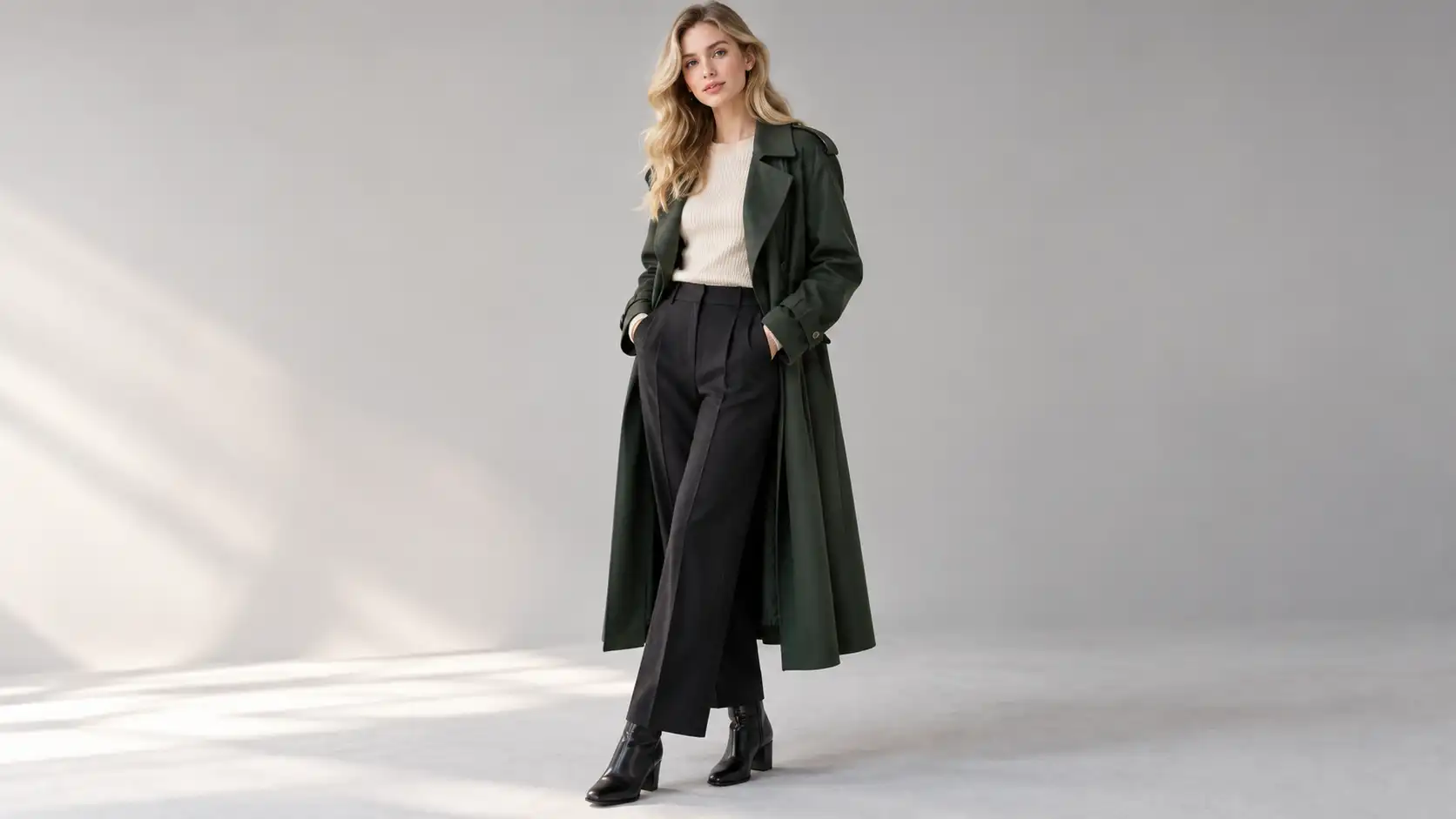 | Keep the character's facial features, medium-length blonde hair, dark green long coat, beige knit top, dark trousers, and overall appearance consistent with the reference image. Place the same character on an old European street after rain, standing outside a vintage bookstore and holding a dark umbrella. Wet stone pavement naturally reflects warm street lighting. Historic buildings in the distance are softly blurred under realistic overcast evening light. Only change the environment. Do not change the character's identity, face, hairstyle, or clothing. | 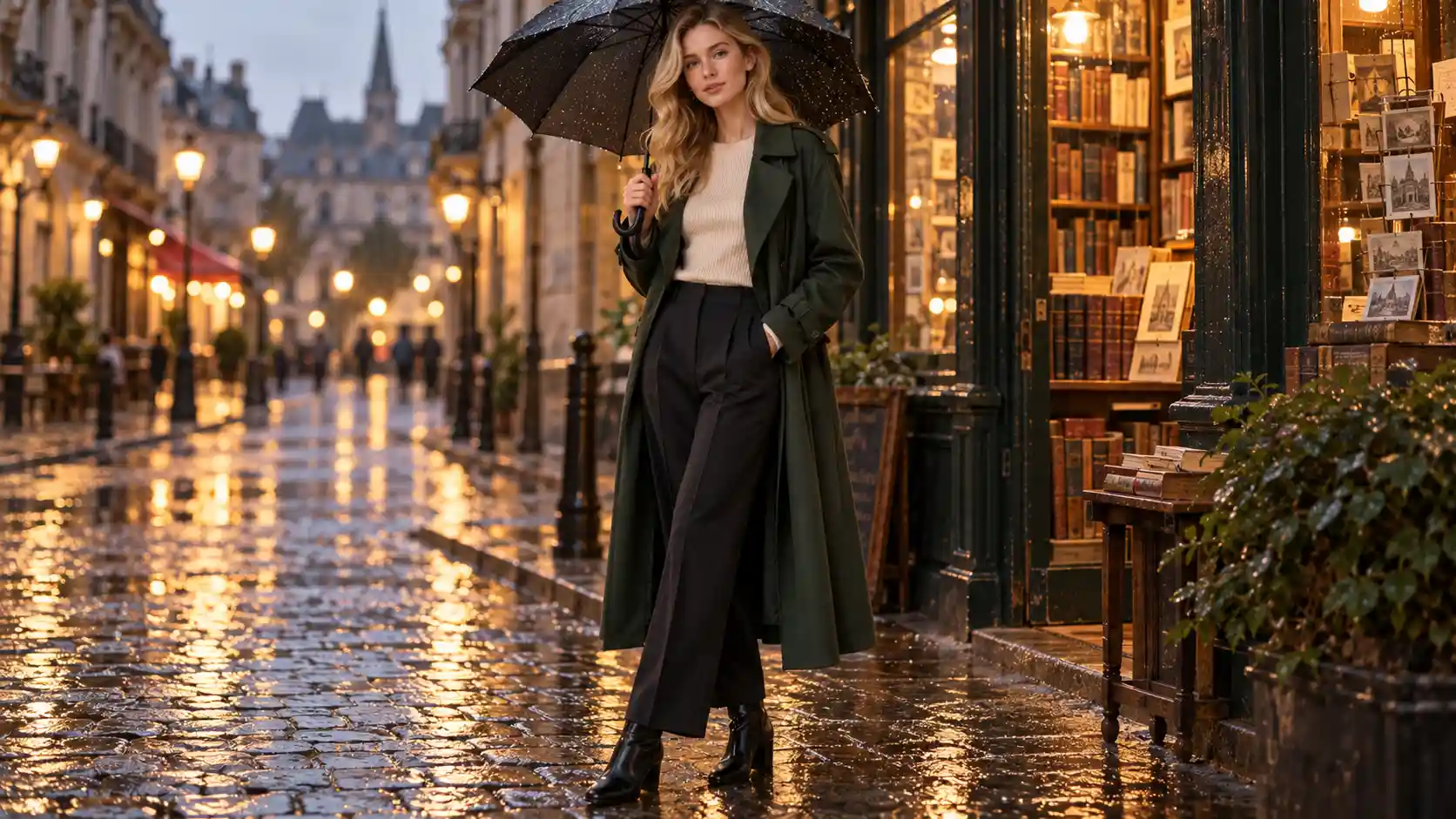 |
What it does:
Tests whether the same character can remain visually recognizable after the environment changes.
Best for:
Story images, branded characters, campaign visuals, and multi-image social content.
Watch out:
Changing the environment is usually safer than simultaneously changing the environment, hairstyle, outfit, pose, and identity.
7. Combine Multiple Reference Images
When you already have separate references for the person, product, and location, do not force the model to invent those elements again.
Assume:
Reference 1 = Character
Reference 2 = Product
Reference 3 = Coffee Shop
Reference Image Prompt
Use Reference Image 1 for the character's appearance. Keep the same facial features, hairstyle, and clothing.
Use the silver laptop from Reference Image 2 as the product reference. Keep its appearance, proportions, and materials unchanged.
Use Reference Image 3 as the coffee shop environment reference, preserving its wooden tables, large windows, and warm interior design.
Create a new realistic 16:9 lifestyle photograph in which the character sits at a wooden table beside the coffee shop window and uses the laptop from Reference Image 2.
Soft natural morning light enters through the window. The character is focused on the laptop screen.
Naturally combine all three reference elements into one believable environment. Do not redesign the character, laptop, or main architectural features of the location.
What it does:
Demonstrates the basic logic behind reference image prompts and multi-reference editing.
Best for:
Brand campaigns, person-and-product advertising, lifestyle visuals, and composite commercial images.
Watch out:
Assign a clear purpose to every reference image. “Use these images as references” is much less precise than explaining what each image controls.
8. Create a Product Poster With Short Text
Image generation models can also be used for posters and simple commercial typography.
The safest approach is to start with short copy, not an entire paragraph.
| Image Prompt | Output |
|---|---|
| 4:5 vertical modern commercial poster. The main subject is a pair of minimal white running shoes floating in the center of a pale gray background, with a soft realistic shadow underneath. Behind the shoes, add very restrained light-gray geometric curves suggesting lightness and movement. At the top of the poster, clearly display the English headline: “MOVE LIGHT” Use large clean black sans-serif typography with accurate spelling and balanced spacing. At the bottom, display only one smaller line: “Designed for Everyday Motion” Minimal Swiss-inspired graphic design, premium sports advertising aesthetic, generous negative space, clear visual hierarchy. Do not add additional text or logos. | 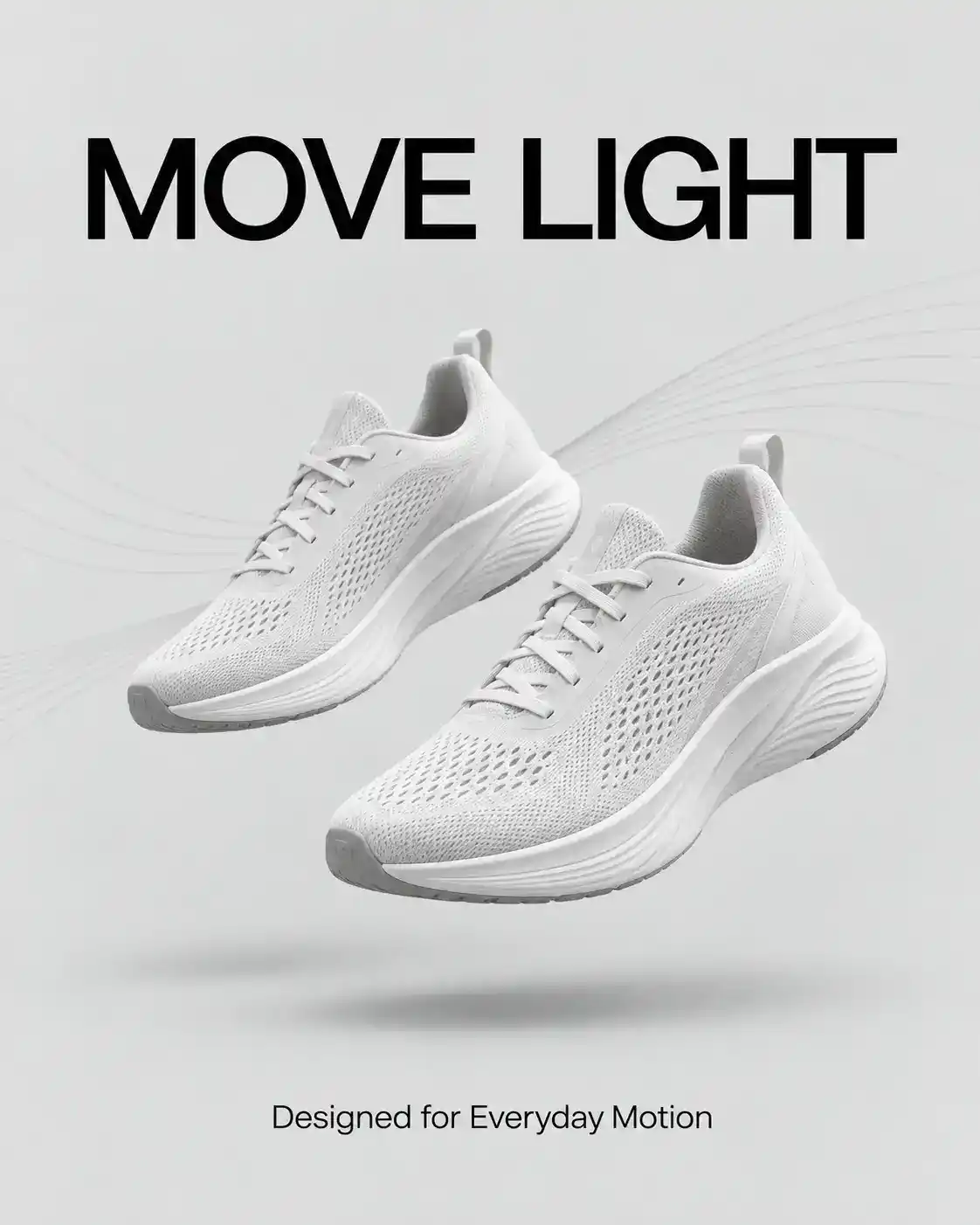 |
What it does:
Tests product composition, typography, and visual hierarchy in one prompt.
Best for:
Posters, banners, social ads, promotional graphics, and concept campaigns.
Watch out:
Keep text short. If typography accuracy matters, always check spelling before publishing.
How to Write Better Nano Banana 2.1 Prompts
For Text to Image, a useful structure is:
Subject + Environment + Action or State + Composition + Lighting + Materials/Style + Restrictions
For Image to Image, use:
What must stay unchanged + What should change + New result/environment + Lighting adaptation + What must not change
That difference matters.
Instead of writing:
Change the background to a study.
Try:
Keep the camera completely unchanged. Only replace the background with a warm study and adapt the contact shadow and reflections to the new environment.
The model needs to understand not only what you want, but also what it is not allowed to redesign.
Three Common Prompt Mistakes
The first mistake is changing too many things at once.
If you change the character, outfit, location, pose, lighting, and camera angle in one edit, visual drift becomes much more likely.
The second mistake is describing only the new result without defining what should remain unchanged. This is particularly risky when working with products and reference images.
The third mistake is endlessly expanding the prompt when a result is already mostly correct.
A more useful workflow is:
Generate → Check → Change One Thing → Generate Again
If 80% of the image already works, preserve it and fix the remaining 20%.
That is usually more controllable than restarting the entire image from scratch.
Final Thoughts
Good AI product photography prompts do not need dozens of decorative adjectives.
If you are generating from scratch, clearly define the product, composition, materials, environment, and lighting.
If you are editing an existing image, start by telling Nano Banana 2.1 what must remain unchanged, then explain what should be modified.
That approach works especially well for product consistency, background replacement, reference-based editing, character consistency, and multi-image workflows.
You can test these Nano Banana 2.1 prompts with Movmix AI Image to Image, or create new commercial visuals from scratch with AI Text to Image.
'%3e%3crect%20y='2.1906'%20width='26'%20height='17.4314'%20rx='1.55981'%20fill='white'/%3e%3c/g%3e%3crect%20x='0.311961'%20y='2.50256'%20width='25.3761'%20height='16.8075'%20rx='1.24784'%20stroke='%2322257C'%20stroke-width='0.623922'/%3e%3c/g%3e%3crect%20x='13.078'%20y='15.5656'%20width='10.8016'%20height='2.49569'%20rx='0.623922'%20fill='%2366B3FF'%20stroke='%2322257C'%20stroke-width='0.623922'/%3e%3crect%20x='-0.311961'%20y='0.311961'%20width='10.8016'%20height='2.49569'%20rx='0.623922'%20transform='matrix(-1%200%200%201%2012.61%2015.2536)'%20fill='%2366B3FF'%20stroke='%2322257C'%20stroke-width='0.623922'/%3e%3crect%20x='10.3093'%20y='13.3231'%20width='4.91339'%20height='6.98013'%20rx='2.45669'%20fill='%2322257C'/%3e%3cpath%20d='M18.9174%200.31543C20.5962%200.268025%2022.1261%200.655527%2023.9487%201.55762C24.0483%201.60695%2024.1137%201.71153%2024.1137%201.8291V16.502C24.1137%2016.7236%2023.8763%2016.891%2023.6499%2016.7979C21.803%2016.0377%2020.2158%2015.6963%2018.4975%2015.7705C16.8915%2015.8399%2015.1907%2016.2732%2013.0776%2017.0332V1.6709C15.4678%200.825877%2017.2746%200.36187%2018.9174%200.31543Z'%20fill='white'%20stroke='%2322257C'%20stroke-width='0.623922'/%3e%3cpath%20d='M15.3008%204.57C16.3536%203.94578%2019.2783%203.20503%2021.8909%203.94608'%20stroke='%2366B3FF'%20stroke-width='0.935883'%20stroke-linecap='round'/%3e%3cpath%20d='M15.3008%207.26054C16.3536%206.63631%2019.2783%205.89557%2021.8909%206.63661'%20stroke='%2366B3FF'%20stroke-width='0.935883'%20stroke-linecap='round'/%3e%3cpath%20d='M15.3008%209.95107C16.3536%209.32684%2019.2783%208.5861%2021.8909%209.32714'%20stroke='%2366B3FF'%20stroke-width='0.935883'%20stroke-linecap='round'/%3e%3cpath%20d='M15.3008%2012.6398C16.3536%2012.0156%2019.2783%2011.2749%2021.8909%2012.0159'%20stroke='%2366B3FF'%20stroke-width='0.935883'%20stroke-linecap='round'/%3e%3cpath%20d='M7.08257%200.31543C5.40384%200.268025%203.87393%200.655527%202.05132%201.55762C1.95165%201.60695%201.88628%201.71153%201.88628%201.8291V16.502C1.88628%2016.7236%202.12373%2016.891%202.35014%2016.7979C4.19702%2016.0377%205.78418%2015.6963%207.50249%2015.7705C9.10852%2015.8399%2010.8093%2016.2732%2012.9224%2017.0332V1.6709C10.5322%200.825877%208.72541%200.36187%207.08257%200.31543Z'%20fill='white'%20stroke='%2322257C'%20stroke-width='0.623922'/%3e%3cpath%20d='M10.6992%204.57C9.64638%203.94578%206.72175%203.20503%204.10907%203.94608'%20stroke='%2366B3FF'%20stroke-width='0.935883'%20stroke-linecap='round'/%3e%3cpath%20d='M10.6992%207.26054C9.64638%206.63631%206.72175%205.89557%204.10907%206.63661'%20stroke='%2366B3FF'%20stroke-width='0.935883'%20stroke-linecap='round'/%3e%3cpath%20d='M10.6992%209.95107C9.64638%209.32684%206.72175%208.5861%204.10907%209.32714'%20stroke='%2366B3FF'%20stroke-width='0.935883'%20stroke-linecap='round'/%3e%3cpath%20d='M10.6992%2012.6398C9.64638%2012.0156%206.72175%2011.2749%204.10907%2012.0159'%20stroke='%2366B3FF'%20stroke-width='0.935883'%20stroke-linecap='round'/%3e%3c/g%3e%3cdefs%3e%3cfilter%20x='0'%20y='2.1906'%20width='26'%20height='17.4314'%20filterUnits='userSpaceOnUse'%20color-interpolation-filters='sRGB'%3e%3cfeFlood%20flood-opacity='0'%20result='BackgroundImageFix'/%3e%3cfeBlend%20mode='normal'%20in='SourceGraphic'%20in2='BackgroundImageFix'%20result='shape'/%3e%3cfeColorMatrix%20in='SourceAlpha'%20type='matrix'%20values='0%200%200%200%200%200%200%200%200%200%200%200%200%200%200%200%200%200%20127%200'%20result='hardAlpha'/%3e%3cfeOffset%20dy='-1.24784'/%3e%3cfeComposite%20in2='hardAlpha'%20operator='arithmetic'%20k2='-1'%20k3='1'/%3e%3cfeColorMatrix%20type='matrix'%20values='0%200%200%200%200.572549%200%200%200%200%200.768627%200%200%200%200%200.976471%200%200%200%201%200'/%3e%3cfeBlend%20mode='normal'%20in2='shape'%20result='effect1_innerShadow_0_4'/%3e%3c/filter%3e%3c/defs%3e%3c/svg%3e)



