
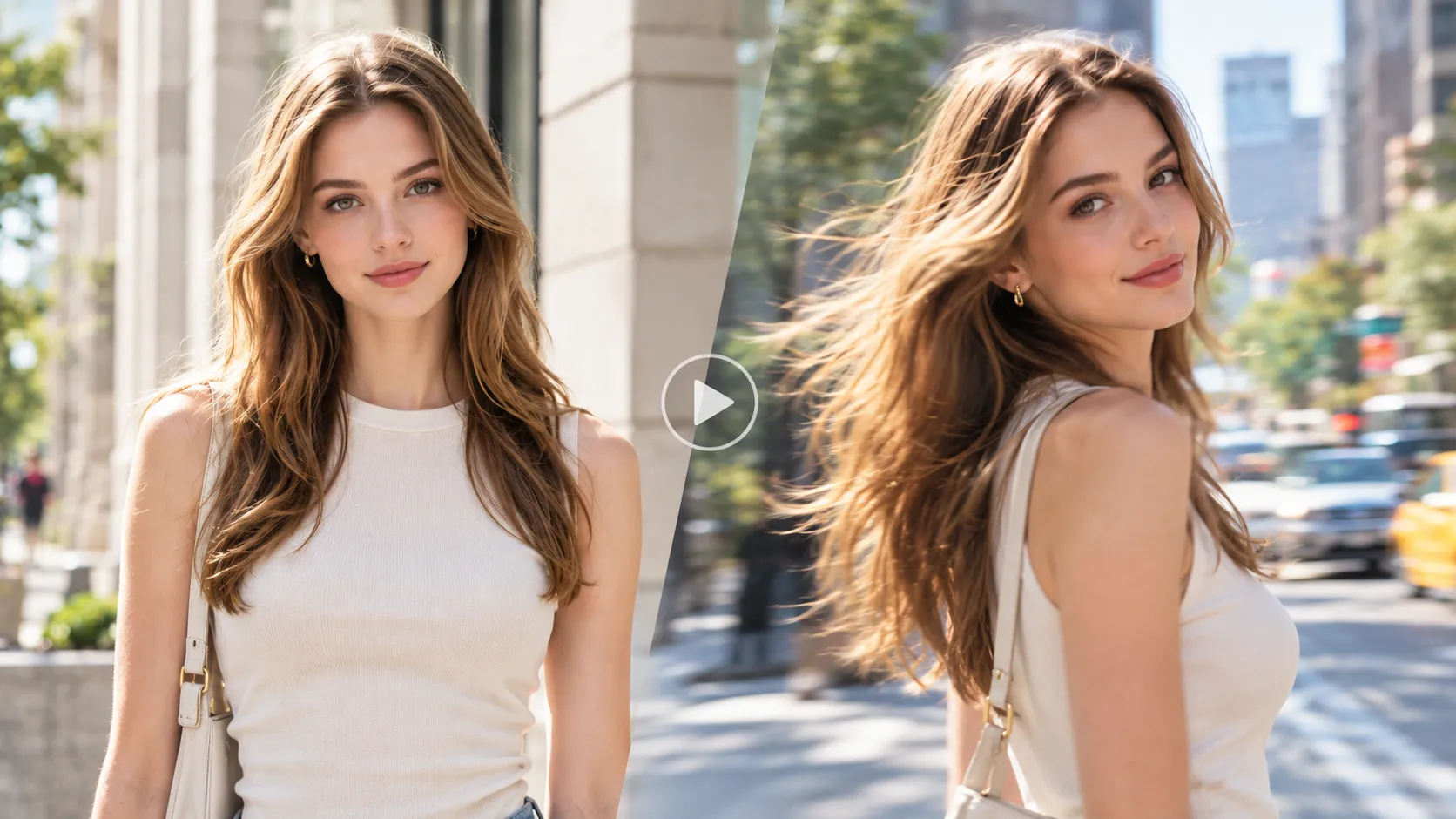
You already have a good image. Now comes the part that actually matters:
How do you make it move without turning the person, product, or scene into something completely different?
With Movmix, the Sora 2 workflow is simple:
Prepare a reference image → Upload it → Choose Sora 2 → Write the Video Prompt → Generate → Refine
The final quality usually comes down to three things: how strong your first frame is, how clearly you describe the motion, and whether you tell the model what must stay unchanged.
If your image is ready, you can start with Movmix AI Image to Video.
1. Your First Frame Should Show What Happens Right Before the Action
The best reference image is not always the prettiest image.
For image-to-video, your first frame already defines the character, clothing, environment, composition, and camera position. Ideally, it should capture the moment just before the main action starts.
For example, imagine we want to create a short pottery studio video. The artist is about to shape wet clay on a pottery wheel.
The first frame should show the wheel, the clay, and the artist's hands ready to move — but the shaping should not have started yet.
| Prompt | Output Image |
|---|---|
| Photorealistic adult male ceramic artist in his early 30s sitting at a pottery wheel inside a bright handmade ceramics studio. A centered block of wet clay sits on the spinning wheel, and his hands are positioned close to the clay, ready to begin shaping it. He wears a simple linen apron over a dark shirt. Soft daylight enters through a side window, shelves of finished ceramics in the background, realistic documentary photography, medium shot, 16:9. |  |
The same rule works almost everywhere: if someone will open a box, start with the box closed; if someone will turn on a lamp, start with the lamp off; if someone will stand up, start with them still sitting.
Your first frame should say “something is about to happen,” not “the story is already over.”
2. Don’t Describe the Whole Image Again
Once your image is uploaded to Movmix and Sora 2 is selected, there is no reason to rewrite everything the image already shows.
If the frame already contains a ceramic artist, pottery wheel, clay, shelves, and a bright studio, you do not need to spend half the prompt describing those things again.
The Video Prompt should focus on one question:
What happens next?
He slowly places both hands around the spinning clay and gently shapes it upward into a taller narrow form. Small traces of wet clay appear on his fingers as the wheel continues rotating. He pauses briefly to inspect the shape. Use a fixed medium shot with subtle natural body movement. Keep his face, apron, pottery wheel and studio layout unchanged. Add a soft pottery wheel hum and quiet workshop ambience.
Now the model has an action plan, not another character biography.
3. Clear Actions Beat Fancy Adjectives
A prompt full of words like:
beautiful, cinematic, stunning, professional, masterpiece
may sound impressive.
But what is actually supposed to happen?
For image-to-video, a clear sequence is usually more useful:
hands approach clay → shape it upward → pause → inspect
Even something simple works:
She picks up the closed envelope, turns it over once, slowly opens the flap, then pauses before looking inside.
Nothing fancy.
But the model knows what should happen first, second, and third.
For AI video, verbs are usually more useful than applause.
4. Use a Simple Sora 2 Prompt Formula
If you do not know where to start, use:
Subject → Action → Camera → Environment → Audio → Keep
For the pottery example:
Subject: Ceramic artist
Action: shapes clay upward → pauses → checks the form
Camera: fixed medium shot
Environment: daylight ceramics studio
Audio: pottery wheel + quiet room ambience
Keep: same face, apron, wheel, and background
You can simplify it even further:
What moves + How the camera moves + What must not change
That is enough for a lot of short AI videos.
If you want more creative use cases, our 8 Sora 2 Video Prompt Examples cover characters, products, dialogue, animals, stylized animation, and multi-shot storytelling. This tutorial is more about getting from one strong image to a stable finished clip.
5. One Short Video Does Not Need an Entire Movie Plot
A common mistake is trying to make one short generation do everything.
Imagine an adult woman sitting at a worktable with a wrapped gift box in front of her.
This is probably too much:
She opens the box, removes the gift, stands up, walks to the window, turns around, smiles, the camera circles her, the lighting changes...
The model may try.
That does not mean you will enjoy what happens next.
A better version:
She lifts the closed gift box, slowly removes the ribbon, opens the lid and looks inside with a small surprised smile.
One clip. One clear event.
If she needs to stand up and walk somewhere afterward, make that the next video.
You get better control, and editing becomes much easier.
6. More Camera Movement Does Not Mean More Cinematic
Useful camera instructions can be very simple:
fixed cameraslow push-ingentle tracking shotslow pan leftcamera tilts upward
That is often enough.
If one prompt contains:
orbit + handheld + crane + dolly + whip pan + dramatic zoom
the question is no longer whether Sora 2 can handle it.
The question is which camera operator is supposed to be in charge.
If the subject already has a lot to do, something as simple as:
Fixed medium shot.
can make the result much more stable.
7. If You Want the Same Person, Say What Must Stay the Same
One of the classic image-to-video moments:
The first frame looks perfect.
Motion begins.
Three seconds later:
“Hi, sorry... who are you?”
If the character needs to stay consistent, make it explicit:
Keep the same face, hairstyle, clothing and body proportions throughout the video.
For products:
Keep the exact product shape, materials, colors and proportions unchanged.
For interiors:
Keep the furniture positions, room layout and background unchanged.
The logic is simple:
First tell the model what to change. Then tell it what not to touch.
That small habit can save a lot of rerolls.
8. Audio Can Stay Simple
You do not need to write a complete sound-design document.
For the pottery scene:
Add a soft pottery wheel hum, subtle hand contact with wet clay and quiet workshop ambience.
For unboxing:
Add soft cardboard movement, ribbon friction and quiet indoor ambience.
For a vintage radio repair scene:
Add subtle switch clicks, light static and quiet room tone.
Audio should support the scene, not fight for attention.
Sometimes one or two small sound cues are enough to make an AI clip feel much more finished.
9. If the First Generation Is Wrong, Fix the Problem — Not the Entire Prompt
This is one of the easiest ways to work faster.
When the first generation is not right, identify the actual failure.
The face changes:
Keep the same face and identity throughout the video.
The action is too fast:
Add slowly, gently, or pauses briefly.
The background starts redesigning itself:
Keep the background completely unchanged.
The camera is too unstable:
Fixed camera.
The character starts doing strange things:
Remove unnecessary actions.
Prompt editing is a lot like debugging.
Fix the thing that broke.
You do not need to rebuild the whole website because one button stopped working.
10. Full Example: Turn a Product Image Into a Short Ad
To keep this tutorial different from our Sora 2 prompt article, let’s use a different product example: a compact wireless speaker.
First, create a clean reference frame.
| Prompt | Output Image |
|---|---|
| Premium compact wireless speaker standing on a smooth light concrete pedestal in a minimal modern studio. Dark woven fabric surface, clean rounded rectangular design, subtle metallic control buttons on top, soft directional daylight creating gentle shadows, realistic commercial product photography, centered composition, 16:9. | 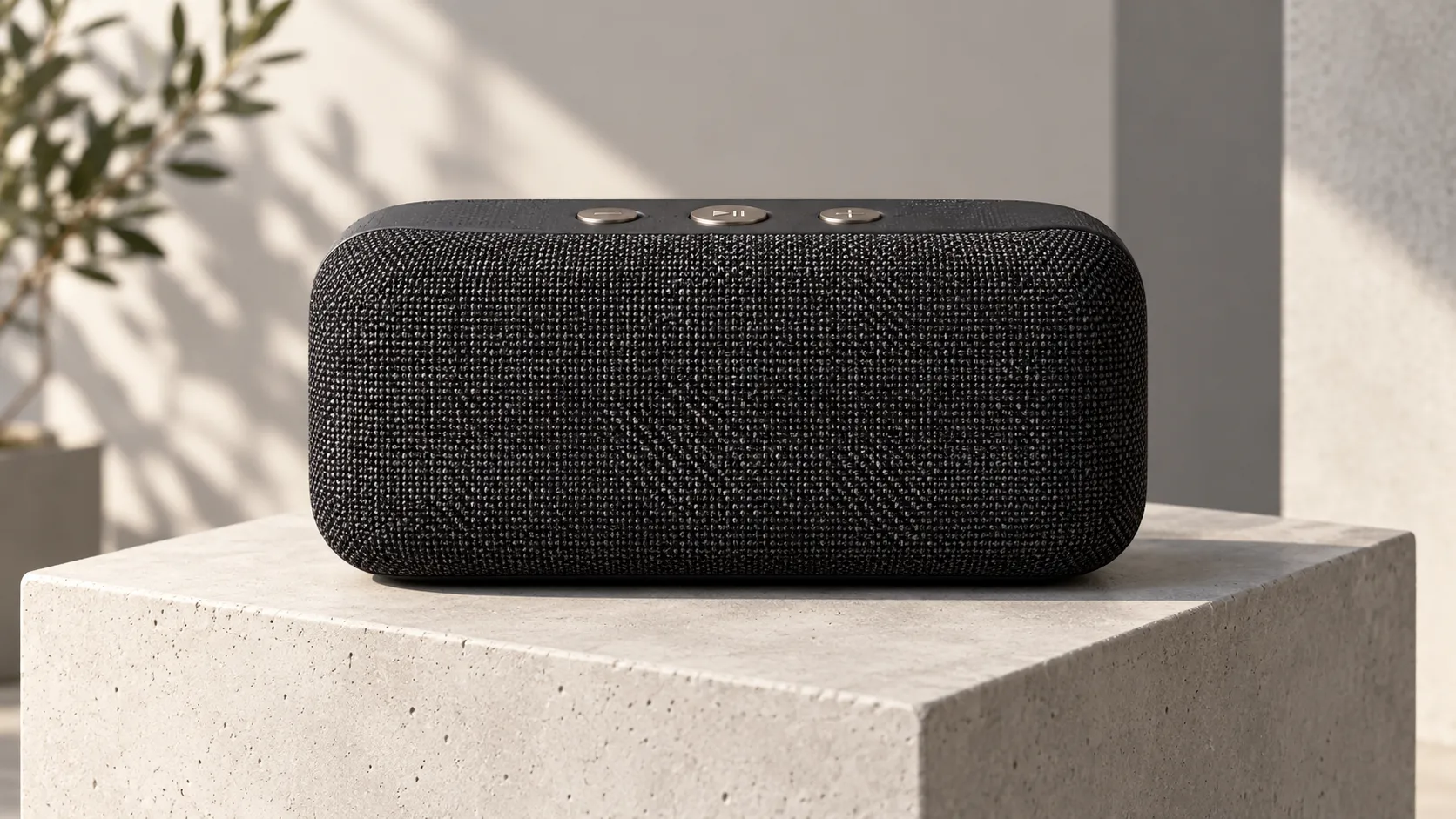 |
Upload the image to Movmix, choose Sora 2, and use:
The speaker remains stationary while the camera slowly moves closer. The fabric surface subtly vibrates with a low bass pulse, and a soft strip of light moves across the front texture. One small indicator light turns on near the top controls. End on a clean close-up product shot. Keep the exact speaker shape, fabric texture, buttons, colors and pedestal unchanged. Add a soft startup tone and subtle low-frequency audio.
No explosion.
No flying parts.
No product breaking apart and rebuilding itself in zero gravity.
Instead, you get texture, movement, lighting, sound, and a clean hero shot.
That is often much closer to what a real brand actually needs.
The commercial value of AI video is not always:
“Wow, that was definitely made with AI.”
Sometimes it is simply:
“That ad looks expensive.”
Common Questions
Is a Longer Sora 2 Prompt Always Better?
No.
For image-to-video, a useful rule is:
Let the reference image handle appearance. Let the Video Prompt handle motion.
If the image already shows the clothing, location, and composition, there is no need to repeat the same information three times.
Why Does My Character Change During the Video?
Too many actions, aggressive camera movement, or weak consistency instructions can all contribute.
Try adding:
Keep the same face, hairstyle, clothing and identity throughout the video.
Then reduce unnecessary motion.
Why Does a Beautiful Image Sometimes Make a Mediocre Video?
Because a beautiful still image only has to work for one moment.
A video also has to survive motion, timing, physics, occlusion, camera movement, and character consistency.
A strong first frame should have a clear subject, readable pose, enough room for movement, and a logical starting state.
What Is Sora 2 Best Used For?
In an image-to-video workflow, it works well for lifestyle clips, product advertising, branded social content, simple story moments, environmental motion, and creative short-form videos.
You do not always need to make an “AI spectacle.”
A product moving subtly in the right way can be more valuable than another explosion in space.
A Strong Image + One Clear Action Is Already Half the Job
People often search for:
“the best Sora 2 prompt.”
A more useful question is:
Is my first frame strong enough, and is the next action clear enough?
A practical workflow looks like this:
Create a strong reference image → Upload it to Movmix → Choose Sora 2 → Describe the next action → Generate → Fix only what needs fixing
Do not start with ten actions, six camera moves, and four visual effects.
Get one simple motion right first.
Then build from there.
That is where Movmix AI Image to Video becomes useful: you decide the first frame and the direction, and let the model handle the motion.
'%3e%3crect%20y='2.1906'%20width='26'%20height='17.4314'%20rx='1.55981'%20fill='white'/%3e%3c/g%3e%3crect%20x='0.311961'%20y='2.50256'%20width='25.3761'%20height='16.8075'%20rx='1.24784'%20stroke='%2322257C'%20stroke-width='0.623922'/%3e%3c/g%3e%3crect%20x='13.078'%20y='15.5656'%20width='10.8016'%20height='2.49569'%20rx='0.623922'%20fill='%2366B3FF'%20stroke='%2322257C'%20stroke-width='0.623922'/%3e%3crect%20x='-0.311961'%20y='0.311961'%20width='10.8016'%20height='2.49569'%20rx='0.623922'%20transform='matrix(-1%200%200%201%2012.61%2015.2536)'%20fill='%2366B3FF'%20stroke='%2322257C'%20stroke-width='0.623922'/%3e%3crect%20x='10.3093'%20y='13.3231'%20width='4.91339'%20height='6.98013'%20rx='2.45669'%20fill='%2322257C'/%3e%3cpath%20d='M18.9174%200.31543C20.5962%200.268025%2022.1261%200.655527%2023.9487%201.55762C24.0483%201.60695%2024.1137%201.71153%2024.1137%201.8291V16.502C24.1137%2016.7236%2023.8763%2016.891%2023.6499%2016.7979C21.803%2016.0377%2020.2158%2015.6963%2018.4975%2015.7705C16.8915%2015.8399%2015.1907%2016.2732%2013.0776%2017.0332V1.6709C15.4678%200.825877%2017.2746%200.36187%2018.9174%200.31543Z'%20fill='white'%20stroke='%2322257C'%20stroke-width='0.623922'/%3e%3cpath%20d='M15.3008%204.57C16.3536%203.94578%2019.2783%203.20503%2021.8909%203.94608'%20stroke='%2366B3FF'%20stroke-width='0.935883'%20stroke-linecap='round'/%3e%3cpath%20d='M15.3008%207.26054C16.3536%206.63631%2019.2783%205.89557%2021.8909%206.63661'%20stroke='%2366B3FF'%20stroke-width='0.935883'%20stroke-linecap='round'/%3e%3cpath%20d='M15.3008%209.95107C16.3536%209.32684%2019.2783%208.5861%2021.8909%209.32714'%20stroke='%2366B3FF'%20stroke-width='0.935883'%20stroke-linecap='round'/%3e%3cpath%20d='M15.3008%2012.6398C16.3536%2012.0156%2019.2783%2011.2749%2021.8909%2012.0159'%20stroke='%2366B3FF'%20stroke-width='0.935883'%20stroke-linecap='round'/%3e%3cpath%20d='M7.08257%200.31543C5.40384%200.268025%203.87393%200.655527%202.05132%201.55762C1.95165%201.60695%201.88628%201.71153%201.88628%201.8291V16.502C1.88628%2016.7236%202.12373%2016.891%202.35014%2016.7979C4.19702%2016.0377%205.78418%2015.6963%207.50249%2015.7705C9.10852%2015.8399%2010.8093%2016.2732%2012.9224%2017.0332V1.6709C10.5322%200.825877%208.72541%200.36187%207.08257%200.31543Z'%20fill='white'%20stroke='%2322257C'%20stroke-width='0.623922'/%3e%3cpath%20d='M10.6992%204.57C9.64638%203.94578%206.72175%203.20503%204.10907%203.94608'%20stroke='%2366B3FF'%20stroke-width='0.935883'%20stroke-linecap='round'/%3e%3cpath%20d='M10.6992%207.26054C9.64638%206.63631%206.72175%205.89557%204.10907%206.63661'%20stroke='%2366B3FF'%20stroke-width='0.935883'%20stroke-linecap='round'/%3e%3cpath%20d='M10.6992%209.95107C9.64638%209.32684%206.72175%208.5861%204.10907%209.32714'%20stroke='%2366B3FF'%20stroke-width='0.935883'%20stroke-linecap='round'/%3e%3cpath%20d='M10.6992%2012.6398C9.64638%2012.0156%206.72175%2011.2749%204.10907%2012.0159'%20stroke='%2366B3FF'%20stroke-width='0.935883'%20stroke-linecap='round'/%3e%3c/g%3e%3cdefs%3e%3cfilter%20x='0'%20y='2.1906'%20width='26'%20height='17.4314'%20filterUnits='userSpaceOnUse'%20color-interpolation-filters='sRGB'%3e%3cfeFlood%20flood-opacity='0'%20result='BackgroundImageFix'/%3e%3cfeBlend%20mode='normal'%20in='SourceGraphic'%20in2='BackgroundImageFix'%20result='shape'/%3e%3cfeColorMatrix%20in='SourceAlpha'%20type='matrix'%20values='0%200%200%200%200%200%200%200%200%200%200%200%200%200%200%200%200%200%20127%200'%20result='hardAlpha'/%3e%3cfeOffset%20dy='-1.24784'/%3e%3cfeComposite%20in2='hardAlpha'%20operator='arithmetic'%20k2='-1'%20k3='1'/%3e%3cfeColorMatrix%20type='matrix'%20values='0%200%200%200%200.572549%200%200%200%200%200.768627%200%200%200%200%200.976471%200%200%200%201%200'/%3e%3cfeBlend%20mode='normal'%20in2='shape'%20result='effect1_innerShadow_0_4'/%3e%3c/filter%3e%3c/defs%3e%3c/svg%3e)



