
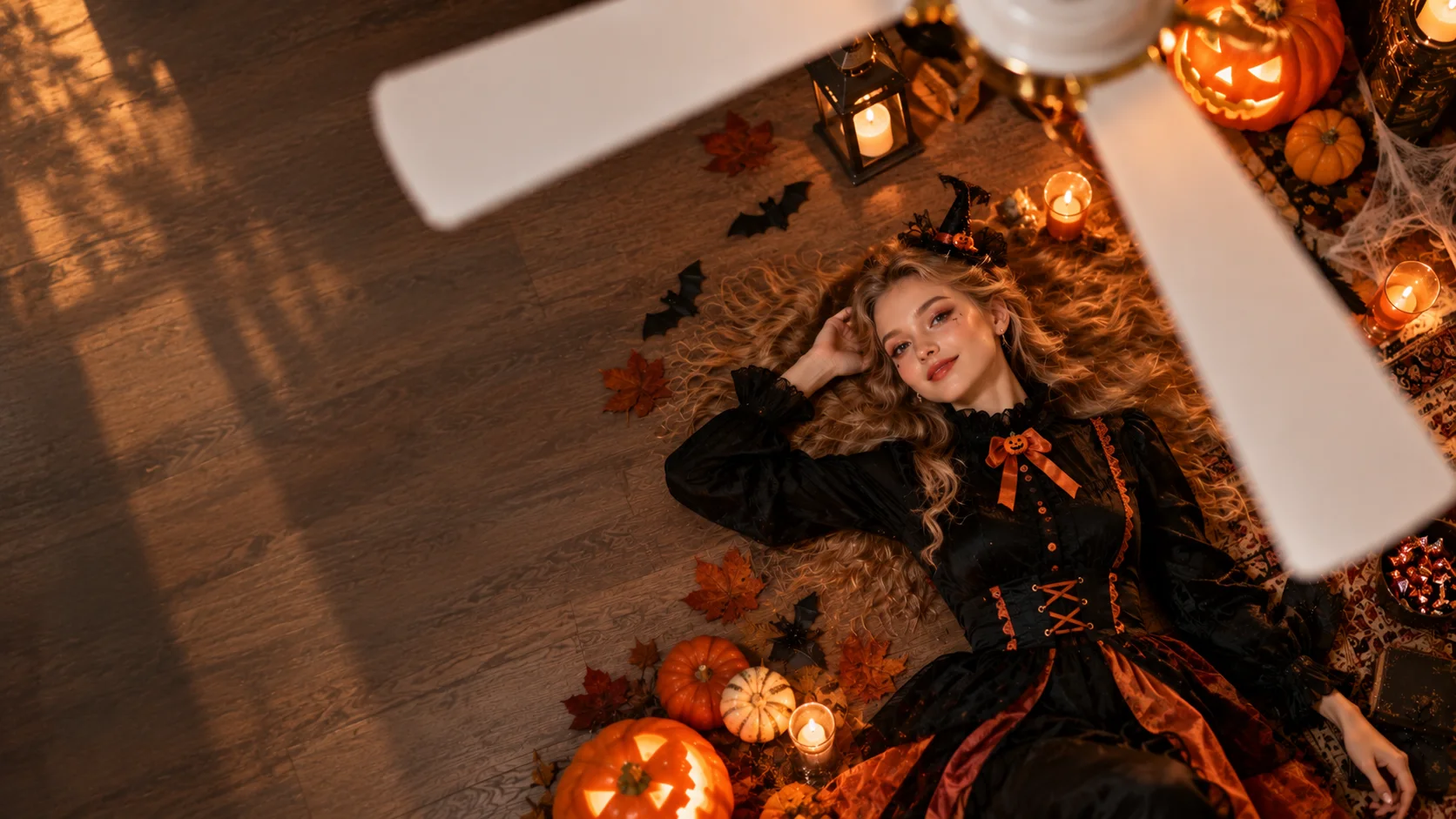
Halloween is almost here, which means TikTok is once again filling up with costume reveals, transformations and videos that make you wonder how many times someone had to change clothes to get one transition right.
One format showing up everywhere is the fan outfit transition: the camera looks down from above, a ceiling fan spins across the frame, and every pass reveals a completely different outfit.
It looks effortless when you watch it.
Making one yourself is another story.
You need the same camera position, similar poses, several outfits, multiple takes and enough patience to line up every cut with the fan blades.
Or you can skip most of that.
With Movmix Halloween Video Templates, you can upload a photo and let AI handle the outfit changes, transitions and Halloween effects for you.
Here are seven templates worth trying this Halloween.
1. SPIN MY LOOK: The TikTok Fan Transition Without the Editing Headache
If there is one format I would try first this Halloween, it is SPIN MY LOOK.
The character stays in roughly the same position while the spinning fan becomes the transition point between different outfits.
Normally, recreating this trend means preparing several looks, filming each version and then matching every cut by hand.
Here, one photo gets you straight to the part you actually wanted: seeing the outfit changes happen.
For anyone planning a Halloween costume video, that saves a surprising amount of work.
And there is another advantage: you can see several looks before spending money on costumes you may never wear again.
Your closet will understand.
Click to Generate SPIN MY LOOK for Free
2. SPIN MY LOOK: A Version Built Around Men’s Looks
There is also another SPIN MY LOOK version featuring male outfit styles.
The concept stays familiar—fan spins, look changes—but the clothing direction is different.
It works well for Halloween styling, character-inspired looks or simply testing how different outfits feel on the same person.
This is where an AI Halloween costume becomes genuinely useful. You are not only making something for TikTok; you can also preview different directions before deciding which look is actually worth recreating.
No changing room required.
Click to Generate SPIN MY LOOK for Free
3. TRICK OR SWITCH: Another Fan Transition, With More Halloween Energy
I have to give whoever named this one some credit.
Trick or Treat became TRICK OR SWITCH, and that pretty much explains the whole template.
It uses the same fan-transition idea, but the visual direction leans more clearly into Halloween.
Every sweep of the fan becomes another chance for the look to change.
This is a good choice when you want something recognizably seasonal without filming four or five versions of yourself in exactly the same position.
Upload the photo.
Let the fan spin.
Let AI deal with the cuts.
Click to Generate TRICK OR SWITCH for Free
4. Halloween Fashion Show: You Already Have the Look—Now Show It Off
Not every Halloween video needs a transformation.
Sometimes the outfit is already good enough.
Halloween Fashion Show takes a different approach: the character walks through a Halloween-themed street and simply shows off the look.
No rapid costume switching. No dramatic creature transformation.
Just a character, a Halloween street and a little main-character energy.
This works especially well if you already know the style you want and need a short social video that presents it naturally.
Think of it as a tiny Halloween street-style shoot—without having to find the perfect street.
Click to Generate Halloween Fashion Show for Free
5. Vampire Transformation: Skip the Costume Change and Become the Vampire
Some Halloween ideas never really disappear.
Vampires are one of them.
With Vampire Transformation, the person does not simply change clothes. The character actually transforms into a vampire.
That makes it a much clearer Halloween transformation than a standard fashion transition.
You start with a normal portrait and end with a completely different Halloween identity.
No fake fangs falling out halfway through the party.
No spending an hour trying to make the makeup symmetrical.
Just upload the image and see what your vampire version looks like.
Click to Generate Vampire Transformation for Free
6. Creepy Carnival Glow-Up: Let AI Handle the Halloween Makeup
Halloween makeup always looks easy in a 30-second tutorial.
Then you try it yourself.
Forty minutes later, one eye looks amazing and the other appears to belong to a completely different person.
That is where Creepy Carnival Glow-Up comes in.
This template focuses on a Halloween makeup transformation, giving the character a much stronger seasonal look without requiring you to actually recreate the makeup first.
It is especially useful if your idea depends more on face styling and atmosphere than on a full costume change.
You still get the reveal.
You just do not have to clean makeup brushes afterward.
Click to Generate Creepy Carnival Glow-Up for Free
7. Ghostface, Get Off My Bed: Halloween Does Not Have to Be Serious
Halloween content does not always need to be dark, cinematic and terrifying.
Sometimes the best idea is simply putting a scary character somewhere completely ordinary.
The title Ghostface, Get Off My Bed already sounds like a TikTok caption.
A character that normally belongs in a horror scene suddenly appears in an everyday setting, and the whole mood shifts from scary to ridiculous.
That contrast makes it easy to understand and easy to share.
Sometimes making people laugh is a perfectly acceptable Halloween strategy.
Click to Generate Ghostface, Get Off My Bed for Free
A Few More Halloween Effects Worth Trying
Once you have tried the main costume and transformation ideas, there are a few more Halloween video effects on Movmix worth opening.
Don't try to scare me takes the Halloween theme in another character-driven direction.
Click to Generate Don't try to scare me for Free
My Halloween Dream is another option when you want something more atmospheric and less focused on a standard costume transition.
Click to Generate My Halloween Dream for Free
And Wait for Green gives you another seasonal setup to experiment with.
Click to Generate Wait for Green for Free
Movmix currently lists all three alongside SPIN MY LOOK, Creepy Carnival Glow-Up, Halloween Fashion Show, TRICK OR SWITCH and Vampire Transformation in its Halloween collection. Movmix
Which Halloween Template Should You Try First?
| What You Want to Make | Template to Try |
|---|---|
| TikTok fan outfit transition | SPIN MY LOOK |
| Male outfit fan transition | SPIN MY LOOK |
| Halloween fan transformation | TRICK OR SWITCH |
| Halloween street-style video | Halloween Fashion Show |
| Character transformation | Vampire Transformation |
| Halloween makeup reveal | Creepy Carnival Glow-Up |
| Funny Halloween content | Ghostface, Get Off My Bed |
If you are mainly chasing the current TikTok style, I would start with SPIN MY LOOK or TRICK OR SWITCH.
Already have a look you love? Go with Halloween Fashion Show.
Want a much bigger before-and-after change? Vampire Transformation gets there faster.
You Do Not Need to Learn the Transition Before Joining the Trend
That is probably the biggest reason these templates make sense.
Normally, you see a Halloween TikTok trend and immediately start thinking about the work behind it:
What outfits do I need?
Where do I put the camera?
How many times do I have to reshoot this?
How do I make the fan transition line up?
With an AI Halloween video, the starting point is much simpler:
Choose a template → Upload your photo → Generate → Post to TikTok or Reels
You can still be creative with the character, photo and style.
You just do not have to become a video editor first.
Browse the full Movmix Halloween Video Templates collection and pick the effect that fits your Halloween plan.
Halloween only comes once a year.
Save your time for the party. Let AI handle the transitions.
'%3e%3crect%20y='2.1906'%20width='26'%20height='17.4314'%20rx='1.55981'%20fill='white'/%3e%3c/g%3e%3crect%20x='0.311961'%20y='2.50256'%20width='25.3761'%20height='16.8075'%20rx='1.24784'%20stroke='%2322257C'%20stroke-width='0.623922'/%3e%3c/g%3e%3crect%20x='13.078'%20y='15.5656'%20width='10.8016'%20height='2.49569'%20rx='0.623922'%20fill='%2366B3FF'%20stroke='%2322257C'%20stroke-width='0.623922'/%3e%3crect%20x='-0.311961'%20y='0.311961'%20width='10.8016'%20height='2.49569'%20rx='0.623922'%20transform='matrix(-1%200%200%201%2012.61%2015.2536)'%20fill='%2366B3FF'%20stroke='%2322257C'%20stroke-width='0.623922'/%3e%3crect%20x='10.3093'%20y='13.3231'%20width='4.91339'%20height='6.98013'%20rx='2.45669'%20fill='%2322257C'/%3e%3cpath%20d='M18.9174%200.31543C20.5962%200.268025%2022.1261%200.655527%2023.9487%201.55762C24.0483%201.60695%2024.1137%201.71153%2024.1137%201.8291V16.502C24.1137%2016.7236%2023.8763%2016.891%2023.6499%2016.7979C21.803%2016.0377%2020.2158%2015.6963%2018.4975%2015.7705C16.8915%2015.8399%2015.1907%2016.2732%2013.0776%2017.0332V1.6709C15.4678%200.825877%2017.2746%200.36187%2018.9174%200.31543Z'%20fill='white'%20stroke='%2322257C'%20stroke-width='0.623922'/%3e%3cpath%20d='M15.3008%204.57C16.3536%203.94578%2019.2783%203.20503%2021.8909%203.94608'%20stroke='%2366B3FF'%20stroke-width='0.935883'%20stroke-linecap='round'/%3e%3cpath%20d='M15.3008%207.26054C16.3536%206.63631%2019.2783%205.89557%2021.8909%206.63661'%20stroke='%2366B3FF'%20stroke-width='0.935883'%20stroke-linecap='round'/%3e%3cpath%20d='M15.3008%209.95107C16.3536%209.32684%2019.2783%208.5861%2021.8909%209.32714'%20stroke='%2366B3FF'%20stroke-width='0.935883'%20stroke-linecap='round'/%3e%3cpath%20d='M15.3008%2012.6398C16.3536%2012.0156%2019.2783%2011.2749%2021.8909%2012.0159'%20stroke='%2366B3FF'%20stroke-width='0.935883'%20stroke-linecap='round'/%3e%3cpath%20d='M7.08257%200.31543C5.40384%200.268025%203.87393%200.655527%202.05132%201.55762C1.95165%201.60695%201.88628%201.71153%201.88628%201.8291V16.502C1.88628%2016.7236%202.12373%2016.891%202.35014%2016.7979C4.19702%2016.0377%205.78418%2015.6963%207.50249%2015.7705C9.10852%2015.8399%2010.8093%2016.2732%2012.9224%2017.0332V1.6709C10.5322%200.825877%208.72541%200.36187%207.08257%200.31543Z'%20fill='white'%20stroke='%2322257C'%20stroke-width='0.623922'/%3e%3cpath%20d='M10.6992%204.57C9.64638%203.94578%206.72175%203.20503%204.10907%203.94608'%20stroke='%2366B3FF'%20stroke-width='0.935883'%20stroke-linecap='round'/%3e%3cpath%20d='M10.6992%207.26054C9.64638%206.63631%206.72175%205.89557%204.10907%206.63661'%20stroke='%2366B3FF'%20stroke-width='0.935883'%20stroke-linecap='round'/%3e%3cpath%20d='M10.6992%209.95107C9.64638%209.32684%206.72175%208.5861%204.10907%209.32714'%20stroke='%2366B3FF'%20stroke-width='0.935883'%20stroke-linecap='round'/%3e%3cpath%20d='M10.6992%2012.6398C9.64638%2012.0156%206.72175%2011.2749%204.10907%2012.0159'%20stroke='%2366B3FF'%20stroke-width='0.935883'%20stroke-linecap='round'/%3e%3c/g%3e%3cdefs%3e%3cfilter%20x='0'%20y='2.1906'%20width='26'%20height='17.4314'%20filterUnits='userSpaceOnUse'%20color-interpolation-filters='sRGB'%3e%3cfeFlood%20flood-opacity='0'%20result='BackgroundImageFix'/%3e%3cfeBlend%20mode='normal'%20in='SourceGraphic'%20in2='BackgroundImageFix'%20result='shape'/%3e%3cfeColorMatrix%20in='SourceAlpha'%20type='matrix'%20values='0%200%200%200%200%200%200%200%200%200%200%200%200%200%200%200%200%200%20127%200'%20result='hardAlpha'/%3e%3cfeOffset%20dy='-1.24784'/%3e%3cfeComposite%20in2='hardAlpha'%20operator='arithmetic'%20k2='-1'%20k3='1'/%3e%3cfeColorMatrix%20type='matrix'%20values='0%200%200%200%200.572549%200%200%200%200%200.768627%200%200%200%200%200.976471%200%200%200%201%200'/%3e%3cfeBlend%20mode='normal'%20in2='shape'%20result='effect1_innerShadow_0_4'/%3e%3c/filter%3e%3c/defs%3e%3c/svg%3e)



