

Kling has begun showing Kling 4.0 Early Access, while Kling 4.0 Flash is also appearing for selected higher-tier users. Among the most discussed upgrades are longer native video generation, up to 10 keyframes, and richer multimodal reference support.
The important part is not simply that videos can become longer. These controls give creators more influence over how a shot develops from its starting point to its final state.
What’s New in Kling 4.0?
| Feature | Announced Direction | Why It Matters |
|---|---|---|
| Video Length | Up to 30 seconds | More room for one shot to develop |
| Keyframe Control | Up to 10 keyframes | Define important visual states during the shot |
| Multimodal References | Up to 15 references | Provide more visual guidance for subjects, scenes and motion |
Kling 3.0 already supports longer continuous generation, so moving toward 30 seconds gives creators more room to build an actual sequence instead of showing only one short action.
The more interesting addition may be Multi-Keyframe Control. Traditional Image to Video often starts with one frame and a prompt, leaving much of the middle to the model. Multiple keyframes can help define what the scene should look like at important moments along the way.
One Example Shows Why Keyframes Matter
Imagine a vintage rail car traveling along a railway built into the side of a massive cliff. Instead of simply prompting “the rail car moves forward and passes a waterfall,” the sequence can be planned around several visual stages:
Rail car starts moving → approaches the waterfall → enters the mist → passes behind the waterfall → camera pulls back to reveal the canyon.
The prompt explains how the vehicle moves, while keyframes can help define which visual states the shot should reach.
| Reference Image Prompt | Output |
|---|---|
| 16:9 horizontal epic realistic cinematic scene. A small vintage red mountain rail car sits on a narrow railway attached to the side of an extremely high cliff. The track follows a massive dark-gray rock wall and curves into the distance, while a deep green canyon and a narrow river lie far below. In the distance, a huge natural waterfall drops vertically from the top of the cliff, creating white mist throughout the canyon. The railway continues behind the waterfall, but the rail car remains far from it in the starting frame. The rail car combines vintage wood details with red metal construction. No clearly visible passengers. The camera is positioned slightly above and behind the vehicle, emphasizing the extreme height, narrow railway and enormous scale of the landscape. Soft overcast daylight, realistic adventure movie photography, dramatic but believable, no text, no logo, no watermark. | 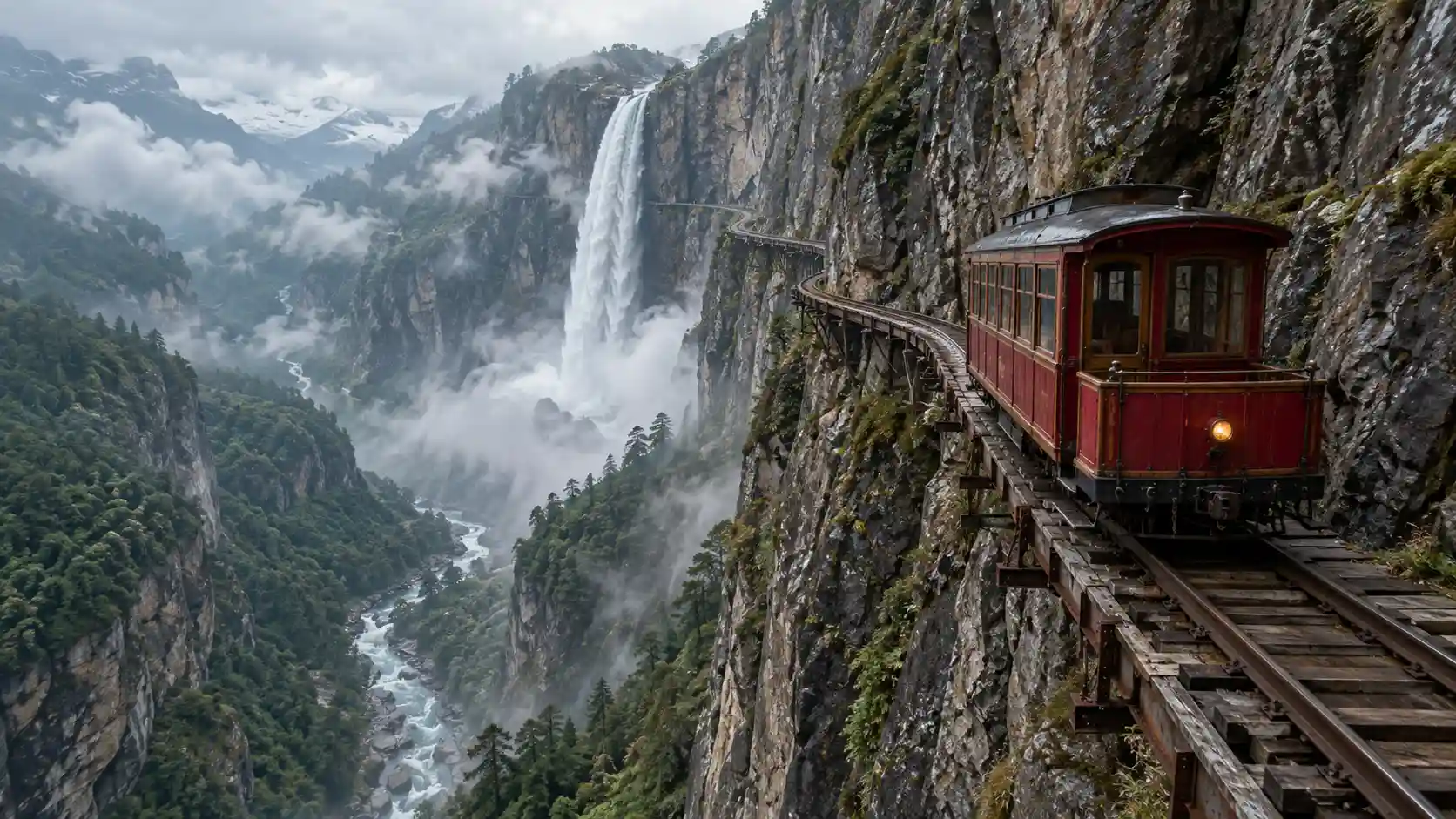 |
Create Now
Video Prompt
The vintage red rail car travels slowly and steadily forward along the narrow railway attached to the cliff. The camera follows smoothly from a slightly elevated rear angle, keeping the vehicle, rock wall and distant canyon visible. As the rail car moves forward, the enormous waterfall gradually occupies more of the frame. The camera slowly shifts outward to reveal the railway approaching the waterfall. The rail car continues along the original track and passes behind the falling water. Fine mist briefly surrounds the vehicle, while its structure, color and movement direction remain stable. Finally, the camera slowly pulls farther away to reveal the small rail car continuing between the gigantic cliff, waterfall and canyon. Keep the railway structure, environment and overcast lighting consistent. No broken tracks, floating vehicle or sudden route changes.
The point of this example is not complicated visual effects. It is about letting one shot move through several clear stages.
More References Can Reduce Prompt Guessing
Another important Kling 4.0 direction is richer reference input. Instead of forcing character appearance, environments, motion and camera behavior into one very long prompt, creators can increasingly use different reference assets for different jobs.
That makes these updates especially relevant to AI Image to Video. The first frame establishes the visual world, reference assets help preserve important details, and the Video Prompt controls what happens next.
Longer generation also makes first-frame planning more important. If the subject starts too close to the edge or the composition leaves no room for movement, those problems may become more obvious as the shot continues.
What Kling 4.0 Means for the Movmix Workflow
This article does not claim that Kling 4.0 is already available on Movmix. Availability should always be checked against the current model list.
However, the direction of Kling 4.0 fits naturally with a broader AI video workflow. Creators can begin with Image to Video, continue a successful scene with an AI Video Extender, and use an AI Video Editor when an existing result needs changes.
The workflow is gradually moving from:
First Frame → Prompt → Generate
toward:
First Frame → References → Key Visual States → Generate → Extend → Edit
Final Thoughts
If you only look at the numbers, Kling 4.0 is about 30 seconds, 10 keyframes and more references. The more important change is that creators are gaining more control over where a shot begins, what happens in the middle, and where it ends.
AI video is not only getting longer. The time inside the video is becoming more controllable.
'%3e%3crect%20y='2.1906'%20width='26'%20height='17.4314'%20rx='1.55981'%20fill='white'/%3e%3c/g%3e%3crect%20x='0.311961'%20y='2.50256'%20width='25.3761'%20height='16.8075'%20rx='1.24784'%20stroke='%2322257C'%20stroke-width='0.623922'/%3e%3c/g%3e%3crect%20x='13.078'%20y='15.5656'%20width='10.8016'%20height='2.49569'%20rx='0.623922'%20fill='%2366B3FF'%20stroke='%2322257C'%20stroke-width='0.623922'/%3e%3crect%20x='-0.311961'%20y='0.311961'%20width='10.8016'%20height='2.49569'%20rx='0.623922'%20transform='matrix(-1%200%200%201%2012.61%2015.2536)'%20fill='%2366B3FF'%20stroke='%2322257C'%20stroke-width='0.623922'/%3e%3crect%20x='10.3093'%20y='13.3231'%20width='4.91339'%20height='6.98013'%20rx='2.45669'%20fill='%2322257C'/%3e%3cpath%20d='M18.9174%200.31543C20.5962%200.268025%2022.1261%200.655527%2023.9487%201.55762C24.0483%201.60695%2024.1137%201.71153%2024.1137%201.8291V16.502C24.1137%2016.7236%2023.8763%2016.891%2023.6499%2016.7979C21.803%2016.0377%2020.2158%2015.6963%2018.4975%2015.7705C16.8915%2015.8399%2015.1907%2016.2732%2013.0776%2017.0332V1.6709C15.4678%200.825877%2017.2746%200.36187%2018.9174%200.31543Z'%20fill='white'%20stroke='%2322257C'%20stroke-width='0.623922'/%3e%3cpath%20d='M15.3008%204.57C16.3536%203.94578%2019.2783%203.20503%2021.8909%203.94608'%20stroke='%2366B3FF'%20stroke-width='0.935883'%20stroke-linecap='round'/%3e%3cpath%20d='M15.3008%207.26054C16.3536%206.63631%2019.2783%205.89557%2021.8909%206.63661'%20stroke='%2366B3FF'%20stroke-width='0.935883'%20stroke-linecap='round'/%3e%3cpath%20d='M15.3008%209.95107C16.3536%209.32684%2019.2783%208.5861%2021.8909%209.32714'%20stroke='%2366B3FF'%20stroke-width='0.935883'%20stroke-linecap='round'/%3e%3cpath%20d='M15.3008%2012.6398C16.3536%2012.0156%2019.2783%2011.2749%2021.8909%2012.0159'%20stroke='%2366B3FF'%20stroke-width='0.935883'%20stroke-linecap='round'/%3e%3cpath%20d='M7.08257%200.31543C5.40384%200.268025%203.87393%200.655527%202.05132%201.55762C1.95165%201.60695%201.88628%201.71153%201.88628%201.8291V16.502C1.88628%2016.7236%202.12373%2016.891%202.35014%2016.7979C4.19702%2016.0377%205.78418%2015.6963%207.50249%2015.7705C9.10852%2015.8399%2010.8093%2016.2732%2012.9224%2017.0332V1.6709C10.5322%200.825877%208.72541%200.36187%207.08257%200.31543Z'%20fill='white'%20stroke='%2322257C'%20stroke-width='0.623922'/%3e%3cpath%20d='M10.6992%204.57C9.64638%203.94578%206.72175%203.20503%204.10907%203.94608'%20stroke='%2366B3FF'%20stroke-width='0.935883'%20stroke-linecap='round'/%3e%3cpath%20d='M10.6992%207.26054C9.64638%206.63631%206.72175%205.89557%204.10907%206.63661'%20stroke='%2366B3FF'%20stroke-width='0.935883'%20stroke-linecap='round'/%3e%3cpath%20d='M10.6992%209.95107C9.64638%209.32684%206.72175%208.5861%204.10907%209.32714'%20stroke='%2366B3FF'%20stroke-width='0.935883'%20stroke-linecap='round'/%3e%3cpath%20d='M10.6992%2012.6398C9.64638%2012.0156%206.72175%2011.2749%204.10907%2012.0159'%20stroke='%2366B3FF'%20stroke-width='0.935883'%20stroke-linecap='round'/%3e%3c/g%3e%3cdefs%3e%3cfilter%20x='0'%20y='2.1906'%20width='26'%20height='17.4314'%20filterUnits='userSpaceOnUse'%20color-interpolation-filters='sRGB'%3e%3cfeFlood%20flood-opacity='0'%20result='BackgroundImageFix'/%3e%3cfeBlend%20mode='normal'%20in='SourceGraphic'%20in2='BackgroundImageFix'%20result='shape'/%3e%3cfeColorMatrix%20in='SourceAlpha'%20type='matrix'%20values='0%200%200%200%200%200%200%200%200%200%200%200%200%200%200%200%200%200%20127%200'%20result='hardAlpha'/%3e%3cfeOffset%20dy='-1.24784'/%3e%3cfeComposite%20in2='hardAlpha'%20operator='arithmetic'%20k2='-1'%20k3='1'/%3e%3cfeColorMatrix%20type='matrix'%20values='0%200%200%200%200.572549%200%200%200%200%200.768627%200%200%200%200%200.976471%200%200%200%201%200'/%3e%3cfeBlend%20mode='normal'%20in2='shape'%20result='effect1_innerShadow_0_4'/%3e%3c/filter%3e%3c/defs%3e%3c/svg%3e)



